Spam Word Checker
Paste your email text to highlight the words and phrases that spam-filter rules score, with plainer alternatives.
Recent
Your last 10 settings, saved only in this browser. Nothing is uploaded.
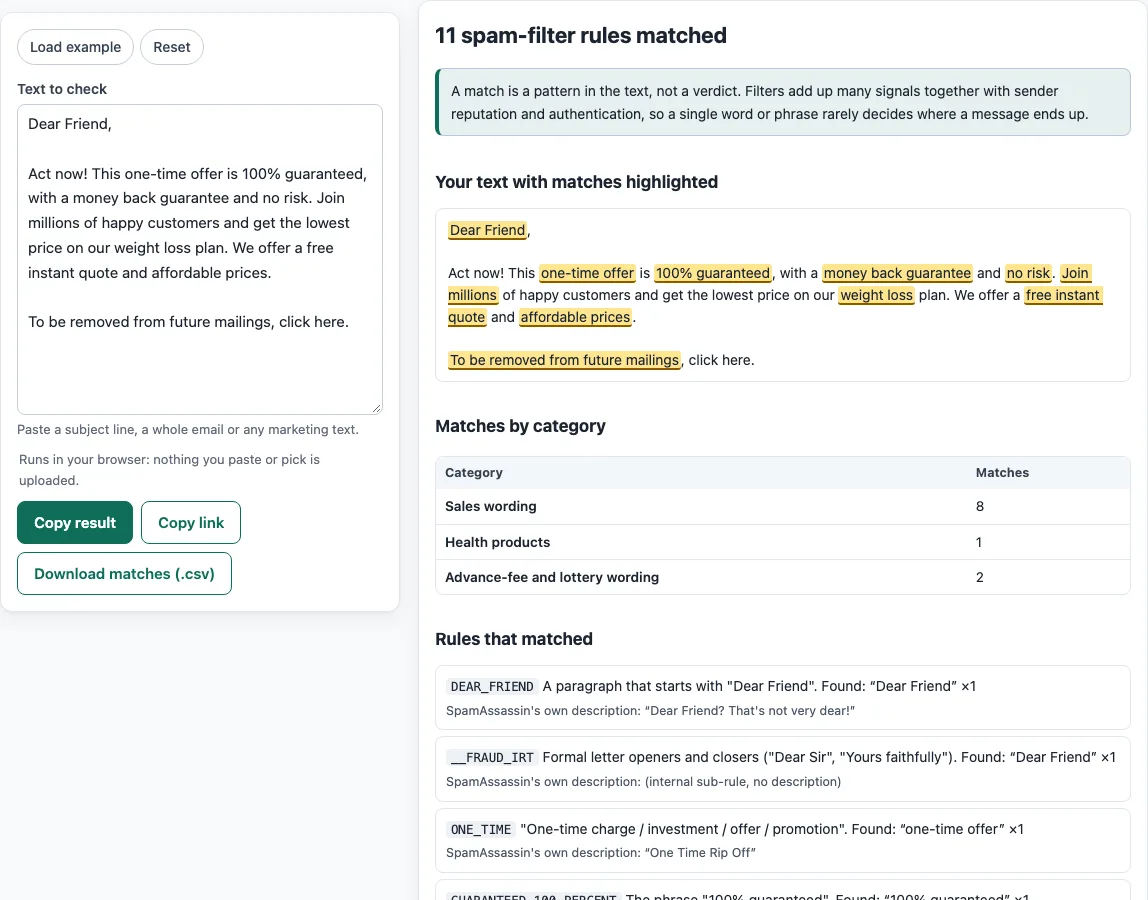
How to use the Spam word checker
- Find the “Text to check” field. It starts with a sample. Click Load example to load the sample again, or Reset to clear the field.
- Paste your subject line and email body into “Text to check,” exactly as you plan to send them.
- Read the highlighted text. Each matched phrase is highlighted in place. Hover over a highlight to see the name of the rule in the tooltip.
- Check the match counts by category to see which kinds of wording appear most often.
- Review the list of matched rules. Each entry shows SpamAssassin’s description of the rule.
- Read “Neutral alternatives (our suggestions)” for rewording ideas. These are our own wording, not text from any filter.
- Browse the filterable list of all phrase rules, grouped by category, with example texts, to see what the checker looks for.
Click Copy result to copy your findings. Click Copy link to copy a link to the check. Click Download matches (.csv) to save a spreadsheet file. The CSV lists the rule, category, count and matched text for each match, and nothing else.
Paste the final text, after merge fields are filled in, so the results match what readers will see.
What does a spam word checker actually look for?
The checker looks for phrases from the phrase rules in Apache SpamAssassin’s 20_phrases.cf file, with related wording from 20_drugs.cf and 20_advance_fee.cf. Examples include MONEY_BACK (“Money back guarantee”), GUARANTEED_100_PERCENT (“One hundred percent guaranteed”) and DEAR_FRIEND (“Dear Friend? That’s not very dear!”). Advance-fee wording relies on many internal _FRAUD* sub-rules, which have no description of their own. The rules come from the Apache SpamAssassin project and are licensed under Apache-2.0.
Why does a match not mean my email is spam?
A match is a pattern, not a verdict. A pattern can match harmless text, such as “Dear Sir” or “risk-free trial,” so a single word rarely decides anything. Filters weigh many signals together. Google and Yahoo both describe spam rate and authentication as the main requirements for senders. This tool cannot see your sender reputation, so it cannot tell you how a filter will treat your message.
Why are rule scores missing from the results?
SpamAssassin combines rules using scores, and those scores are set per installation. They also change between releases and deployments. This tool does not reproduce scores, so it shows which rules matched, not a total score.
How are repeated and overlapping matches counted?
Repeated matches are counted each time they appear. When two patterns overlap, the text is highlighted once and all of the matching rule names are listed. Empty text and text with no matches are handled as well.
Does capital letter use change what gets matched?
Yes, for some rules. ACT_NOW_CAPS and BILLION_DOLLARS are case-sensitive in the original, and LOW_PRICE needs a capital P in “Price.” Our DRUGS_ERECTILE and DRUGS_DIET entries are simplified, because the originals also match obfuscated spellings. A clean result here therefore does not rule out those spellings.
Rewording a phrase that matched is usually easy and costs nothing, so treat the highlights as a quick editing pass rather than a reason to rewrite the whole email.
Sources (checked 13 October 2026): GitHub · GitHub (2) · GitHub (3) · Google Support · Yahoo Sender Hub
Frequently asked questions
Is the tool free, and is anything I paste uploaded?
The tool is free, and there is no account or sign-up. Everything runs in your browser, so nothing you type, paste or open is uploaded. The site does not send email, look up DNS records or see sender reputation. The checks only read what you paste or open.
Can a clean result mean my email will reach the inbox?
No. A clean result only means that none of the phrase rules in the list matched your text. Delivery depends on many other factors, including sender reputation and authentication.
Does the checker look at the sender, headers or links?
No. The phrase rules read the wording you paste. The browsable list shows only body and subject rules, because the HTML, URI and header rule files in SpamAssassin are not phrase lists.
Should I paste the subject line too?
Yes. Paste the subject line with the body, because subject-scope rules are part of the list and can match there.
Why is a normal phrase highlighted?
Some rules match ordinary wording, such as a polite greeting or a common sales term, because spammers use the same words. If the phrase is honest and clear, you can keep it; the highlight only tells you a rule looks for it.
Can I check text in another language?
The phrase rules are English, so text in other languages will rarely match. A clean result for non-English text does not mean anything about how filters will read it.
Related tools
- Email spam checker: use it when you want a broader check of an email, not just its wording.
- Subject line tester: use it to test a subject line on its own before you send.
- Email preheader tool: use it to write the preview text that follows your subject line.
- Email header analyzer: use it to read the headers of a message you have opened.
- Email HTML validator: use it to check the HTML of an email for structural problems.
- Email signature generator: use it to create a signature, footer or template for your emails.