Signature Generator (Handwritten Signature Maker)
Type your name to see it in handwriting styles, or draw your signature with a mouse, finger or pen, then download it as an image.
Recent
Your last 10 settings, saved only in this browser. Nothing is uploaded.
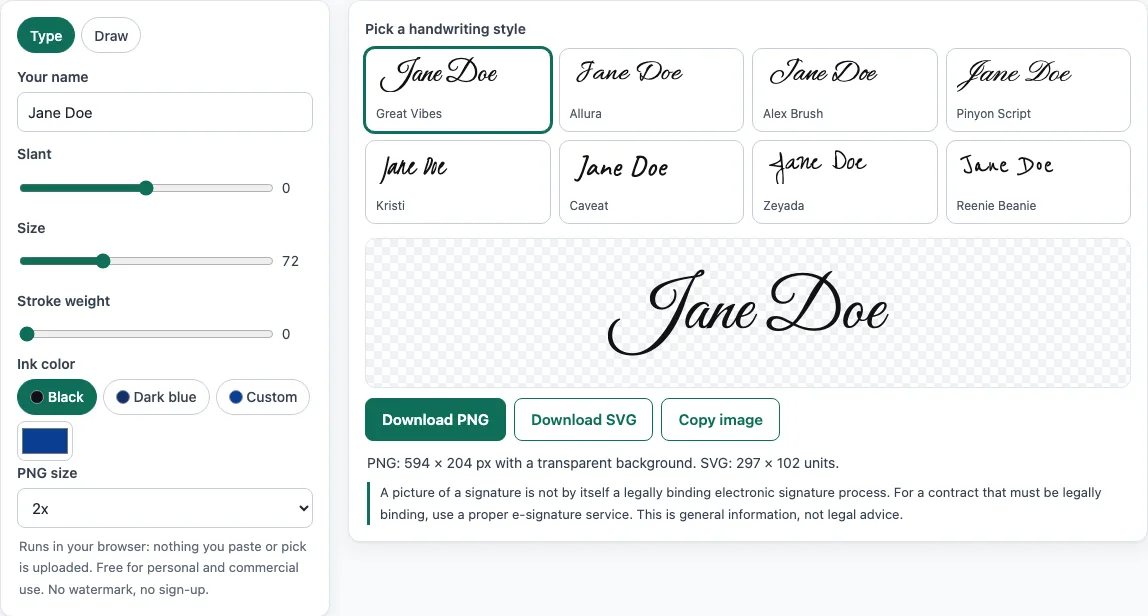
How to use the signature generator
- Open the Type tab and enter your name in the Your name field.
- Choose one of the 8 handwriting fonts in the Font list.
- Pick a color: black, dark blue, or a custom color.
- Adjust Slant, Size and Stroke weight until the signature looks right.
- To write your own signature instead, switch to the Draw tab. Draw with a mouse, your finger on a touchscreen, or a pen.
- In the Draw tab, set the Pen width and Color. Use Smoothing to tidy up wobbly strokes, Undo to remove the last stroke, and Clear to start again.
- Download the signature with Download PNG (choose 1x, 2x or 3x), Download SVG, or Copy image.
The PNG download has a transparent background, so the signature can sit over a white or colored area without a box around it. The Copy image button needs a secure connection (HTTPS) and a browser that supports copying PNG images to the clipboard. If it does not work, download the PNG and insert the file instead. The tools are free, and what you make may be used for any purpose, including commercial use, without attribution and without a watermark.
In the Draw tab, sign slowly in one smooth movement for the cleanest result; Undo removes only the last stroke, so a small slip is easy to correct.
Is a signature generator signature legally binding?
A signature made with a signature generator is not legally binding by itself. A picture of a signature is only an image file. Whether a signature counts in a deal depends on the process around it, not on how the mark looks.
What counts as an electronic signature under US law?
Under the US E-SIGN Act, an electronic signature is defined in 15 U.S.C. 7006(5) as “an electronic sound, symbol, or process, attached to or logically associated with a contract or other record and executed or adopted by a person with the intent to sign the record.” The key parts are the process, the link to a specific record, and the intent to sign. A file that shows your name in a handwriting font does not show any of these by itself. The law also says a signature “may not be denied legal effect, validity, or enforceability solely because it is in electronic form” (15 U.S.C. 7001(a)). That protects electronic signatures that meet the definition. It does not turn every image into one.
Why does consent matter for consumer documents?
For consumer disclosures sent in electronic form, 15 U.S.C. 7001(c)(1) requires the consumer’s affirmative consent and specific disclosures before the electronic records can be used. This is one reason proper e-signature services track more than the signature itself. If you need a signed electronic record for a customer or a legal agreement, check the requirements with a qualified professional.
How does a typed or drawn signature become an image file?
For a typed signature, the browser draws your chosen font onto a canvas. The canvas is then saved as a PNG, which keeps transparent pixels, or as an SVG. For drawn signatures, the stroke points are smoothed with Chaikin corner cutting, which cuts each segment at one quarter and three quarters, followed by quadratic curves through the midpoints. This gives cleaner curves than raw mouse or touch input. The SVG version carries its font inside the file as a data URI, because SVG images cannot load external files.
Which fonts does the signature generator use?
The Type tab offers eight open-licence handwriting fonts: Alex Brush, Allura, Caveat, Great Vibes, Kristi, Pinyon Script, Zeyada and Reenie Beanie. The SIL Open Font License 1.1 allows these fonts to be used, embedded and redistributed, including in commercial products. Each font is cut down to Latin characters to keep the page fast. Some popular script fonts were left out because their licence reserves the font name, which stops a modified version from using it.
Sources (checked 13 October 2026): Cornell LII · Cornell LII (2) · MDN · MDN (2) · MDN (3) · openfontlicense.org
Frequently asked questions
Is the tool free, and is anything I paste uploaded?
Yes, the tool is free and there is no sign-up. Everything runs in your browser, so the names, text and drawings you enter are not uploaded.
Does the downloaded signature have a watermark?
No. The PNG and SVG downloads have no watermark.
Can I use my signature for business purposes?
Yes. What the tools make may be used for any purpose, including commercial use, without attribution.
Is a signature from this tool legally valid?
A picture of a signature is not, by itself, a legally binding electronic signature. Validity depends on the process, intent and record involved, so check the requirements for your document.
Which download format should I choose?
Choose PNG if you want a transparent image for documents or web pages. Choose SVG if you want a file that stays sharp at any size. The 2x and 3x PNG options give more pixels for printing or large displays.
Why are the 2x and 3x PNG files larger?
They contain more pixels, but the resolution metadata stays at 96 dpi. The image is more detailed, not higher in dpi.
Why does Copy image not work in my browser?
Copying images requires a secure connection (HTTPS) and browser support for copying PNG images. Download the PNG if copying is not available.
Can the tool send my signature by email?
No. The site does not send email, so you will need to add the downloaded image to your email or document yourself.
Related tools
- Email signature generator for building a full signature block to paste into your email client.
- Email signature templates when you want a ready-made layout to customise.
- Company email signature generator for a consistent signature across a team.
- Email signature logo tool when you need to add or check a logo in your signature.
- Email signature dark mode check to see how your signature looks in dark mode.
- Email footer generator for adding legal lines or contact details below your message.