Resignation Email Generator
Type your details and the two dates to get a resignation email with a subject line and the length of notice worked out for you.
Recent
Your last 10 settings, saved only in this browser. Nothing is uploaded.
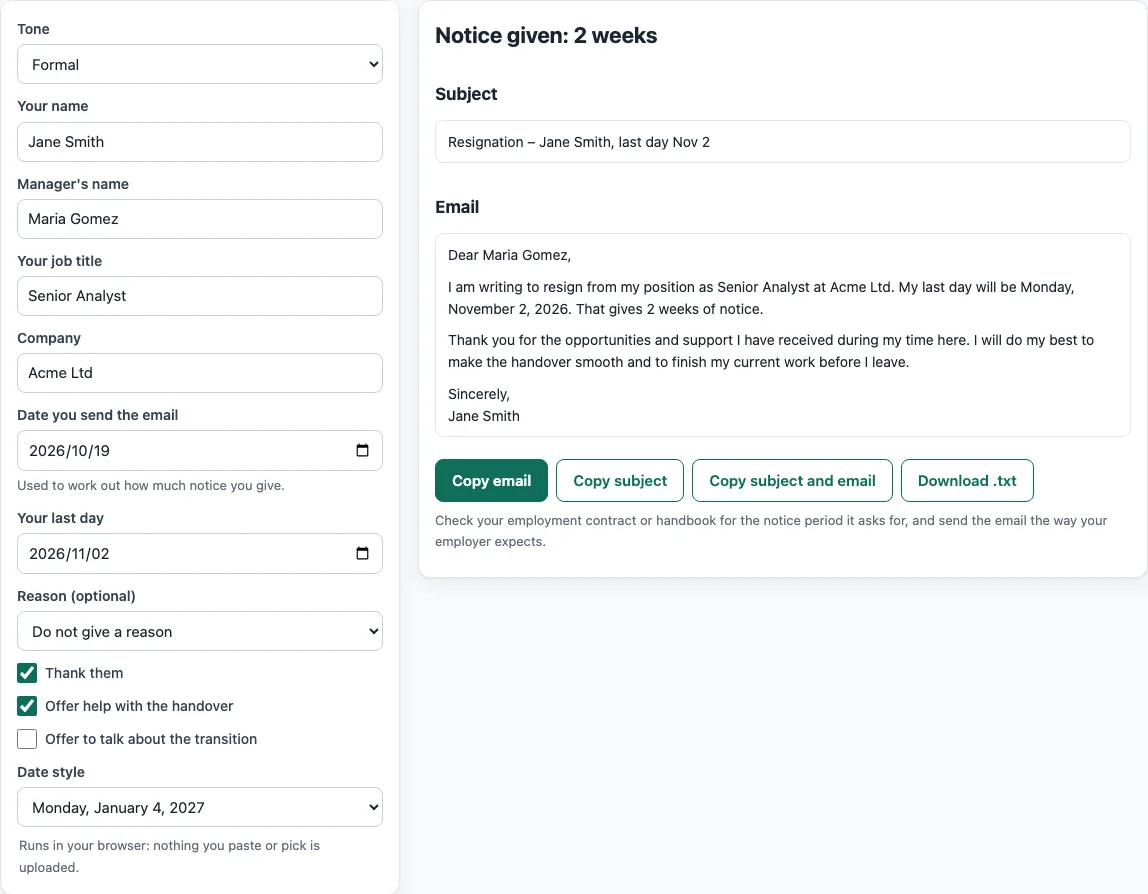
How to use the resignation email tool
- Choose a Tone: Formal, Warm or Short.
- Type your details in Your name, Manager’s name, Your job title and Company.
- Enter the date you are sending the email in Date you send the email, and your final working day in Your last day.
- Pick a Reason from the list, or choose Do not give a reason to leave it out.
- Tick any options you want: Thank them, Offer help with the handover or Offer to talk about the transition.
- Choose Date style, either US or UK.
- Read the Subject and Email panels. They update as you type, so check the notice line before you copy anything.
- Click Copy email, Copy subject, Copy subject and email or Download .txt.
Every option after the tone is optional. Leave out the fields you do not need and the tool skips them, so the email stays short. Date style only changes how dates are written. The notice sentence appears only when both dates are filled in and the last day is after the sending date, so a missing date never produces a wrong number. Download .txt saves the finished email as a plain text file, which is handy if you want to edit it in another program later.
How do I write a resignation email?
A resignation email is a short, polite message to your manager that states you are resigning and gives your last day. Keep it to a few sentences, and send it to the person your employer names, which is usually your manager.
Start with a clear subject line that says it is a resignation. Then write a greeting and one sentence that says you are resigning from your position and company. Next, give your last day as a specific date. If you want to give a reason, add it as one plain sentence. Finish with a thank you, an offer to help with the handover, and a closing such as “Sincerely” or “Thanks”. Check that the last day matches your notice period, then send it and keep a copy for your records. These steps are common practice, not a legal rule.
How much notice should I give?
Your notice period is usually set in your employment contract or staff handbook, so check those first. The tool does not know your contract or local law, and it gives no legal advice. What it does is work out the notice length from the two dates you enter.
Notice is calculated between the date you send the email and your last day. For example, from 19 October 2026 to 2 November 2026 is 14 days. The tool shows “Notice given: 2 weeks” and writes “That gives 2 weeks of notice.” If the gap is not a whole number of weeks, it shows the length in days instead, such as 10 days. If your last day is before the sending date, a warning appears and no notice sentence is written. Fix the dates before you copy the email.
What does a resignation email look like?
Here is the formal version the tool writes for the default sample (Jane Smith, Senior Analyst at Acme Ltd, sending on 19 October 2026 with 2 November 2026 as the last day, a new job as the reason, and thanks and handover ticked):
Subject: Resignation – Jane Smith, last day Nov 2
Dear Maria Gomez,
I am writing to resign from my position as Senior Analyst at Acme Ltd. My last day will be Monday, November 2, 2026. That gives 2 weeks of notice.
I have accepted a new role elsewhere.
Thank you for the opportunities and support I have received during my time here. I will do my best to make the handover smooth and to finish my current work before I leave.
Sincerely, Jane Smith
Switch the tone to Warm and the same details open with “I wanted to let you know personally that I am resigning from my role as Senior Analyst at Acme Ltd.” Switch to Short and the email shrinks to the resignation, the last day and “Thanks,”.
Should I tell my manager before I send the email?
If you can, tell your manager directly first, so the email is a written confirmation and not a surprise. Your employment contract or handbook may also say how your employer wants notice to be given, so check it before you send anything. This is common practice, and the tool does not know your employer’s rules.
Sources
Checked 18 October 2026: the content of the email follows common workplace practice; the notice length is counted by the tool from the two dates you type. No legal rule about notice is stated here because it depends on your contract and local law.
Frequently asked questions
Do I need to give a reason?
No, a reason is optional. Choose one from the Reason list to add a single plain sentence, or choose “Do not give a reason” to leave it out entirely. The tool never writes anything negative about the employer.
What should the subject line be?
The tool writes a subject in this form: “Resignation – Jane Smith, last day Nov 2”. It names you and gives the last day, so your manager can find the message easily.
Which tone should I choose?
Formal opens with “I am writing to resign” and closes with “Sincerely”. Warm opens with a personal greeting such as “Hi Maria” and closes with “Best wishes”. Short gets straight to the point and closes with “Thanks”. Pick the one that fits your relationship with your manager.
What happens if I leave a field empty?
Missing fields are skipped. Without a manager’s name the email starts with “Hello,”. Without a job title or company, the first sentence is shortened rather than left with blanks.
Can I use the text at work?
Yes. The text the tool produces is yours to use anywhere, including at work or in a business, and you do not need to give credit.
Is anything I type sent or saved?
The tool runs in your browser. Nothing is uploaded or sent, and your entries are not written to the page address. Only choices such as tone or date style are.
Related tools
- Out of office message: use it to tell people you are away from work and when you will reply.
- Subject line tester: use it to check how clear and long your email subject is before you send.
- Email preheader: use it to write the short preview text that appears next to the subject in an inbox.
- Email signature generator: use it to create a sign-off block with your name, title and contact details.
- Write email text: use it when you need help drafting other kinds of email from scratch.