HTML Email Builder
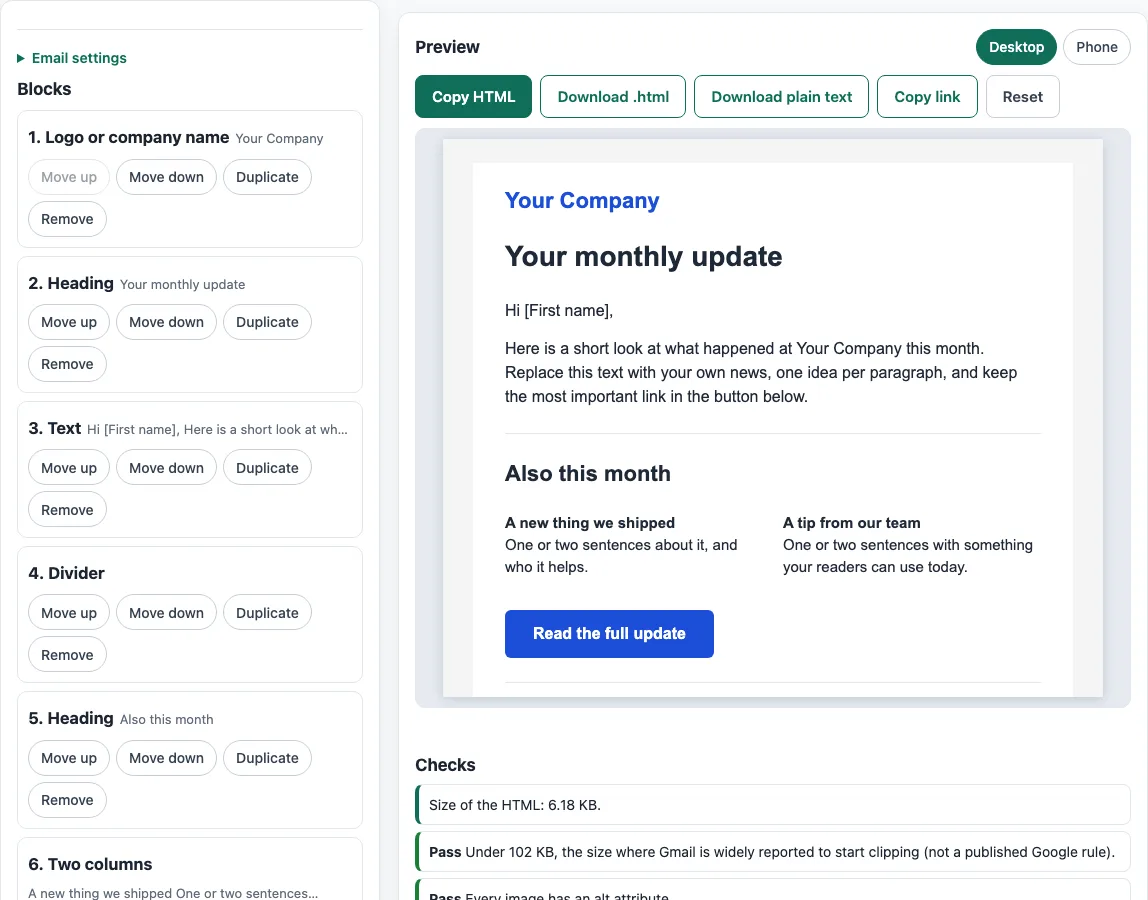
Add and reorder blocks, edit the text and colors, and copy the finished email as table-based HTML and plain text.
Recent
Your last 10 settings, saved only in this browser. Nothing is uploaded.
This free HTML email builder lets you assemble an email template in your browser and then copy or download the HTML. You add blocks such as a logo, heading, text, image, button, two columns, divider, spacer, social links and footer, adjust the email settings, and check the layout in a desktop or phone preview. There is no account or sign-up.
The output uses tables and inline styles, the layout approach that email clients handle most reliably. Live checks flag common problems before you send, including image alt text, http addresses, leftover placeholders and a missing unsubscribe link. You can also export a plain-text version for recipients who cannot display HTML.
Use it for newsletters, announcements, order updates and other emails where you want a clean layout without writing HTML by hand.
How to use the HTML email builder
- Choose a block in the “Block to add” list, such as Heading, Text or Image, then select “Add block”.
- Fill in the block’s fields. Text blocks accept bold, italic and text links, and a blank line starts a new paragraph.
- Put blocks in order with “Move up” and “Move down”. Select “Duplicate” to copy a block or “Remove” to delete it. There is no drag-and-drop.
- Open “Email settings” to set the width (320 to 700, default 600), the page, body, text, link and accent colors, the font, the preview text, the document title, the language code, dark-mode styles and the Outlook button fallback.
- Select “Preview Desktop” or “Preview Phone” to check the layout at each size.
- Read the live checks for size, alt text, http addresses, leftover placeholders and the unsubscribe link, and fix anything flagged.
- Select “Copy HTML” or “Download .html” to export the template. Select “Download plain text” for a text version.
Your design is kept in the page address as a ?s= value and in a draft in this browser, so “Copy link” gives you a URL that reopens the same email. If your browser blocks local storage, for example in a private window, the address still holds the design. Select “Reset” to start again. Like any html email editor, it cannot show you every mail app’s rendering, so send a test to your own accounts before you email a list.
Why does an HTML email template use tables and inline styles?
Email clients render HTML differently from web browsers, so the builder lays out content with tables and writes colors and sizes directly onto each element. Outlook for Windows uses Word’s rendering engine, which does not support flex or grid layouts. <style> support is also partial, so the builder keeps <style> only for the column-stacking media query and the optional dark-mode rules.
Do images in an HTML email need alt text?
Yes. Every image should have alt text, because it appears when images are blocked and is read aloud by screen readers. The builder warns about any image block with empty alt. The HTML standard has a section on alternative text for images, including decorative ones, so read it if you are unsure what to write. Images must use absolute https addresses, because an email is not hosted next to its images. The builder adds width and height where it knows them, and sets display:block and border:0 so images sit cleanly in the layout.
Which fonts work in an HTML email designer?
The builder offers six web-safe font stacks: Arial, Georgia, Verdana, Trebuchet MS, Tahoma and Courier New, each with a generic fallback. Custom fonts loaded with @font-face have only partial support in email. Where they do work, they need a link tag, and they do not work with a Microsoft email address. Web-safe stacks avoid that uncertainty, so choose one of them for body text.
Why does the footer need an unsubscribe link and a postal address?
The FTC’s CAN-SPAM compliance guide says commercial email needs a valid physical postal address and a working opt-out. Opt-out requests must be honored within 10 business days, and the opt-out mechanism must still work 30 days after sending. The builder only flags a footer with no unsubscribe link. It does not decide which rules apply to you, so check the rules for the places and recipients you email.
Sources (checked 13 October 2026): url · [Microsoft Learn](https://learn.microsoft.com/en-us/previous-versions/office/developer/office-2007/aa338201(v=office.12) · Can I email · Can I email (2) · Can I email (3) · help.drip.com
Frequently asked questions
Is the tool free, and is anything I paste uploaded?
Yes, the tool is free and needs no account. Everything runs in your browser, so text you type, paste or open is not uploaded anywhere. The site does not send email, look up DNS records or see sender reputation. Its checks only read what you paste or open. The templates and footers it makes may be used for any purpose, including commercial use, without attribution.
Does Gmail clip long HTML emails?
Gmail clips messages above about 102 KB. That figure is widely reported, but Google has not published it as a rule, and the builder’s size check says so. Keep the template short to stay well under it.
Will dark-mode colors show in every email app?
No. Based on caniemail’s data, tested on 8 March 2023, dark-mode styles work in Apple Mail, Outlook for Mac, Outlook.com and Samsung Email, but not in Gmail, Outlook for Windows, Yahoo or Thunderbird. Gmail on iOS and Android only accepts the “light only” value of the color-scheme meta tag. Test in the apps your readers use.
What is the plain-text version for?
A plain-text version is the text part of a multipart/alternative email, which lets a mail app show plain text when it cannot display HTML. “Download plain text” writes your headings and paragraphs, shows each button as “label: url”, and places “–” before the footer.
Can I paste the HTML into my email sending service?
Often yes. “Copy HTML” and “Download .html” give you the markup. Before you send, check whether your service accepts pasted HTML and whether it adds its own footer or tracking links, since those could duplicate or change what you built.
Related tools
- Email footer generator: create a footer with your contact details and unsubscribe wording to paste into your email.
- HTML email templates: start from a ready-made layout instead of building from blank.
- Email spam checker: look over your subject line and wording for common spam signals before sending.
- Email template size calculator: measure the size of your HTML if you are concerned about clipping.
- Email font size preview: see how your text sizes look before you finalise the layout.
- Email HTML validator: check your markup for errors after you have pasted it in.