Gmail Attachment Size Limit: Check Gmail, Outlook and Yahoo
Type or pick your attachments to see whether they fit the Gmail, Outlook.com, Yahoo and Microsoft 365 limits once email has encoded them.
Recent
Your last 10 settings, saved only in this browser. Nothing is uploaded.
How to use the attachment size checker
- Type each attachment on its own line, such as
12 MB,800 KBorreport.pdf 1.5 GB. A number with no unit is read as MB. - Or use the file picker to choose your files. Only the file size is read, and nothing is uploaded.
- Choose how 1 MB is counted: 1,048,576 bytes (Windows) or 1,000,000 bytes (macOS).
- Read the comparison table. Each provider is marked Fits, Could fail or Too big.
- For Fits, check the margin left. For Too big, check how much you need to remove.
- Copy or save the result from the output panel with Copy result.
The tool counts only the attachments you list, so add a little room for your message text and signature. Typed sizes and file names are not written to the page address.
If the result says Could fail, the files themselves are under the limit but the encoded message is not. Remove or compress one file and watch the table update until every provider you care about shows Fits. Use the Sample button to reload the example, or Reset to clear the box and start with your own files. Press Copy result to take the table with you as plain text, for example to paste into a message to a colleague who needs to resend the files.
What is the Gmail attachment size limit?
For a personal Gmail account, the limit is 25 MB for the attachments in one email. Google’s help page for this limit gives that figure. For Google Workspace accounts, the administrator sets the limits, and Google’s page does not give a number for them.
Why is my email too large when the files are under the limit?
Email does not send files in their original form. Binary files are converted to base64 text (defined in RFC 2045), where every 3 bytes become 4 characters. The text is split into lines of at most 76 characters, each followed by a line break. The result is about 37 percent bigger than the files.
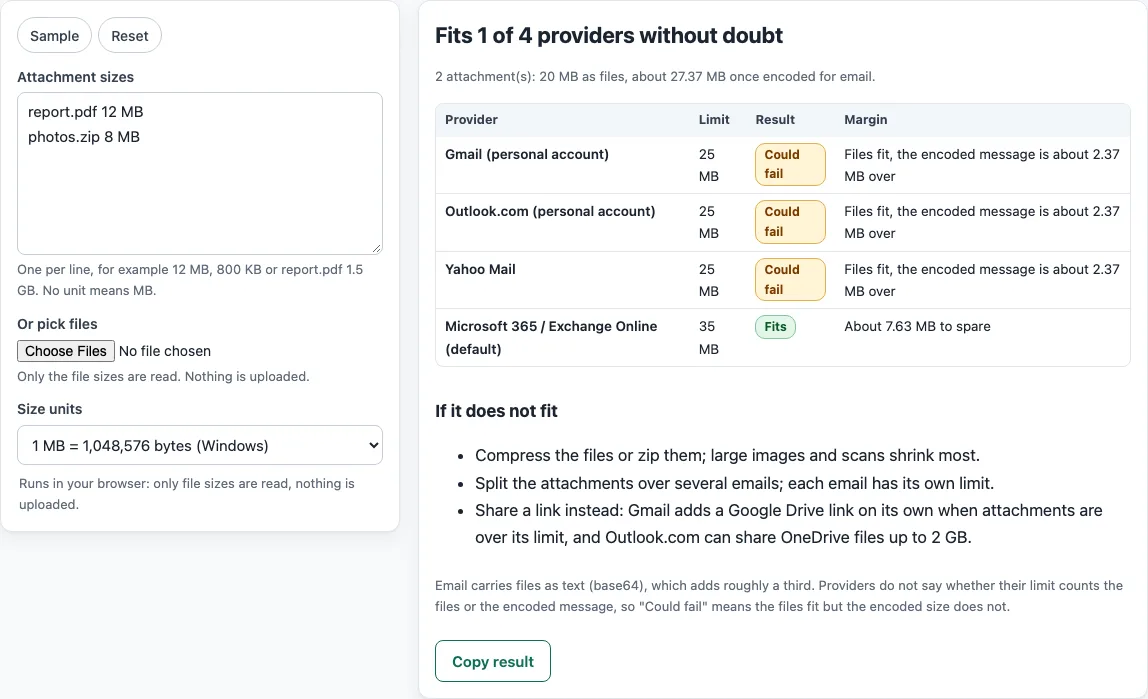
For example, report.pdf at 12 MB and photos.zip at 8 MB make 20 MB of files. Once encoded, the message is about 27.37 MB. That is over 25 MB, so the message could fail for Gmail, Outlook.com and Yahoo Mail. It still fits Microsoft 365’s default 35 MB sending limit.
Providers do not say whether their limit counts the files or the encoded message. The tool therefore shows Could fail when the files fit but the encoded size does not. To stay within 25 MB after encoding, a single file can be at most about 18.27 MB.
What is the Outlook attachment size limit?
Two Microsoft pages disagree for Outlook.com. The “Sending limits in Outlook.com” page says the attachment limit for files is 25 MB and that OneDrive files can be up to 2 GB, while an older help article about reducing attachment size still says 20 MB. The tool uses the newer 25 MB figure.
Work and school mailboxes on Microsoft 365 follow Exchange Online instead. The default maximum message size is 35 MB for sending and 36 MB for receiving, administrators can set it anywhere from 1 MB to 150 MB, and Microsoft says the limit includes attachments. A company can therefore have a lower or a higher limit than the default shown in the table.
What is the email size limit across providers?
For the personal accounts in the table the figure is the same, 25 MB, for Gmail, Outlook.com and Yahoo Mail, while the Microsoft 365 default is 35 MB. Google Workspace limits are set by the administrator and Google’s page gives no number for them. A message also has to pass the receiving provider, so the lowest limit on either side is the one that matters.
Sources
Read 18 October 2026: Google Help, Gmail attachment size limit (25 MB, Google Drive link); Microsoft Support, Sending limits in Outlook.com (25 MB, OneDrive 2 GB); Microsoft Learn, Exchange Online limits (page dated 7 April 2026: 35 MB sending, 36 MB receiving, 1 to 150 MB); Yahoo Help, attachment limit SLN5673 (25 MB); RFC 2045 section 6.8 for the base64 encoding.
Frequently asked questions
What is the Outlook attachment size limit?
For Outlook.com personal accounts, Microsoft’s support page gives 25 MB for files attached to an email. You can also share OneDrive files up to 2 GB by link. Microsoft 365 and Exchange Online use a default size of 35 MB for sending and 36 MB for receiving, and administrators can set it between 1 MB and 150 MB.
What is the Yahoo Mail attachment limit?
Yahoo Mail allows 25 MB of total file size per message, for both sending and receiving. This total covers all attachments in the message.
What happens when attachments are over the limit?
In Gmail, Google removes the attachments and adds a Google Drive link to the email automatically. For other providers, you can compress or zip the files, split them across several emails, or share them as a link.
Does the limit include the email text?
Yes. The size of the whole message counts, not only the files, so your text and signature add a little. The tool counts only the attachments you enter and estimates the encoding overhead for them, so leave some room under the limit.
Why is iCloud Mail not in the table?
No readable official source for a regular attachment limit was found for iCloud Mail or other providers. For that reason, the table covers only the providers that have a published limit.
Are my files uploaded when I use the tool?
No. The tool runs in your browser and reads only the file sizes. Nothing is uploaded or sent, and you do not need an account.
Related tools
- Email spam checker: use it to check a draft for common spam signals before you send it.
- Email header analyzer: use it to read the routing and authentication details in a message’s headers.
- Subject line tester: use it to compare and refine subject lines before you send.
- Spam, subject lines and headers: use it to find all of the email tools in one place.