Email Spam Checker (Content Check)
Paste the subject and body of your email, or open an .eml file, to see which spam-filter rules it matches and what to fix.
Recent
Your last 10 settings, saved only in this browser. Nothing is uploaded.
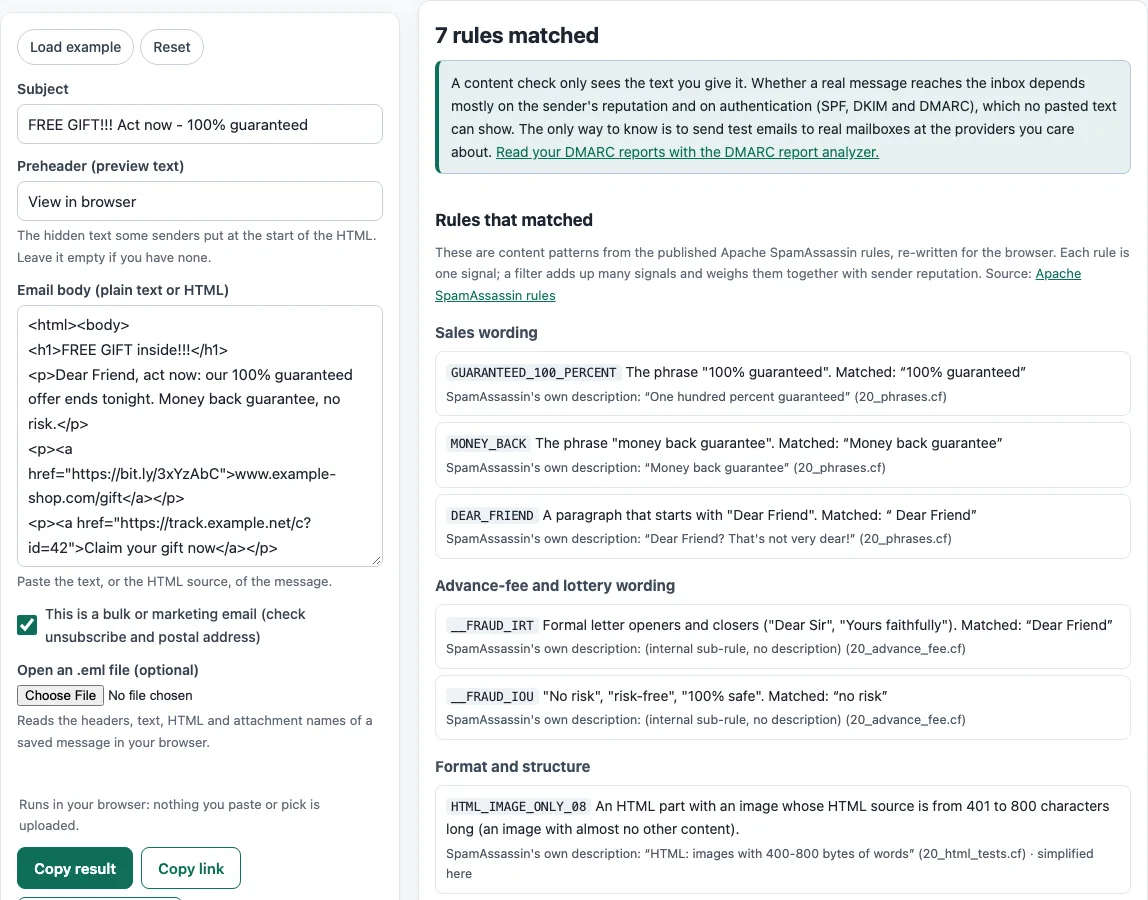
How to use the Email spam checker
- Type or paste your message into the Subject field.
- Add your opening line to Preheader (preview text).
- Paste the message into Email body (plain text or HTML). Plain text and HTML both work.
- Tick This is a bulk or marketing email if the message goes to a list or promotes something.
- If you saved the message as a file, click Open an .eml file (optional) and choose it instead of pasting.
- Check the N rules matched count, then read each finding under Content, Links, and Compliance.
- Look at the highlighted subject, preheader, and body to see which words or links triggered each rule.
- Edit the email, then run the check again until the findings are ones you can explain or have fixed.
Load example fills the fields with sample text so you can see a full result before using your own. Reset clears everything. Copy result and Copy link share what you see, Print / save as PDF saves a copy, and Download report (.txt) saves the findings as a text file.
Run the check on the final version of the email, after merge fields are filled in, because placeholder text such as [FIRST NAME] is itself flagged.
What does a matched rule mean?
A matched rule means one test found a pattern in your email. It does not mean the email is spam. The tool’s rules come from Apache SpamAssassin, which publishes each rule as a separate test, and the scores that weigh those tests are set per installation and change between releases. For that reason, the tool reports which rules matched and never adds them into a score.
Some examples of what the rules look at:
- All-capitals subject. The check strips “Re:” and “Fwd:”, then looks for more than one word with at least 10 letters that are all capitals.
- Capitals in the body. Lines with a lot of capitals are counted, and text under 200 characters is skipped.
- Images without text. An HTML part that is mostly image, with little text, can match. Images should have alt text, and alt="" marks a decorative image.
- Links. Link text that shows one domain while the link goes to another, and shortened links, are both flagged.
- Unfilled merge fields. Placeholders such as [FIRST NAME] or %%x%% left in the text are flagged.
Some findings concern compliance rather than wording. Bulk and marketing email should include a working one-click unsubscribe, which Google and Yahoo both ask for, and a valid postal address, which the CAN-SPAM Act requires. Gmail also blocks many attachment types, including .exe, .js, and .bat, and compressed forms of them.
A useful routine is to run this check while you write, then send test messages to a few accounts at different mail providers before a campaign. Only real test sends show where a message lands.
Remember that the same email can be filtered differently by different providers, because each one weighs content, sender history and authentication in its own way.
Fix the findings you agree with and ignore the rest.
Sources (checked 13 October 2026): GitHub · GitHub (2) · GitHub (3) · Google Support · Yahoo Sender Hub
Frequently asked questions
Is the tool free, and is anything I paste uploaded?
Yes, the tool is free, and there is no account or sign-up. Everything runs in your browser, so nothing you type, paste, or open is uploaded.
The site does not send email, does not look up DNS records, and cannot see sender reputation. The check reads only the text you give it. Sender authentication (SPF, DKIM, and DMARC) is outside its view, so for that, use the DMARC report analyzer.
Does this email spam checker give a spam score?
No. It reports “N rules matched” and shows each rule’s description and the text it matched. Scores for these rules vary between SpamAssassin installations, so the tool does not report one.
If the check shows no matched rules, will my email reach the inbox?
Not necessarily. The check only reads content. It cannot see sender reputation, or whether SPF, DKIM, and DMARC are set up for your domain.
Why is my subject line flagged for being all capitals?
The rule fires when the subject, after removing “Re:” or “Fwd:”, has more than one word and at least 10 letters, all of them capitals. Switching to normal sentence case usually clears it.
Do I need one-click unsubscribe for bulk email?
For marketing mail, yes. Google requires one-click unsubscribe for marketing and subscribed messages, and Yahoo requires a list-unsubscribe header for bulk senders. The RFC 8058 standard uses a List-Unsubscribe-Post header with the value List-Unsubscribe=One-Click, plus a List-Unsubscribe header with one HTTPS link.
Can I check an email I saved as a file?
Yes. Use Open an .eml file (optional). The file is read in your browser, which handles headers, multipart messages, quoted-printable and base64 encoding, and RFC 2047 and 2231 parameters.
Related tools
- Spam word checker: use it to look at individual words and phrases before you run the full check.
- Subject line tester: use it to compare subject line options before you settle on one.
- Email preheader tool: use it to write preview text that supports your subject line.
- HTML email builder: use it to build a layout when you want to add images and buttons.
- HTML email templates: use them as a starting point for a clean layout with fewer risky elements.
- Email footer generator: use it to add the unsubscribe and postal address details that compliance checks look for.
- Email banner size calculator: use it to size header images so they load well in email.
- Email signature generator: use it to create a signature for your personal or work email.