Email Signature Template Gallery
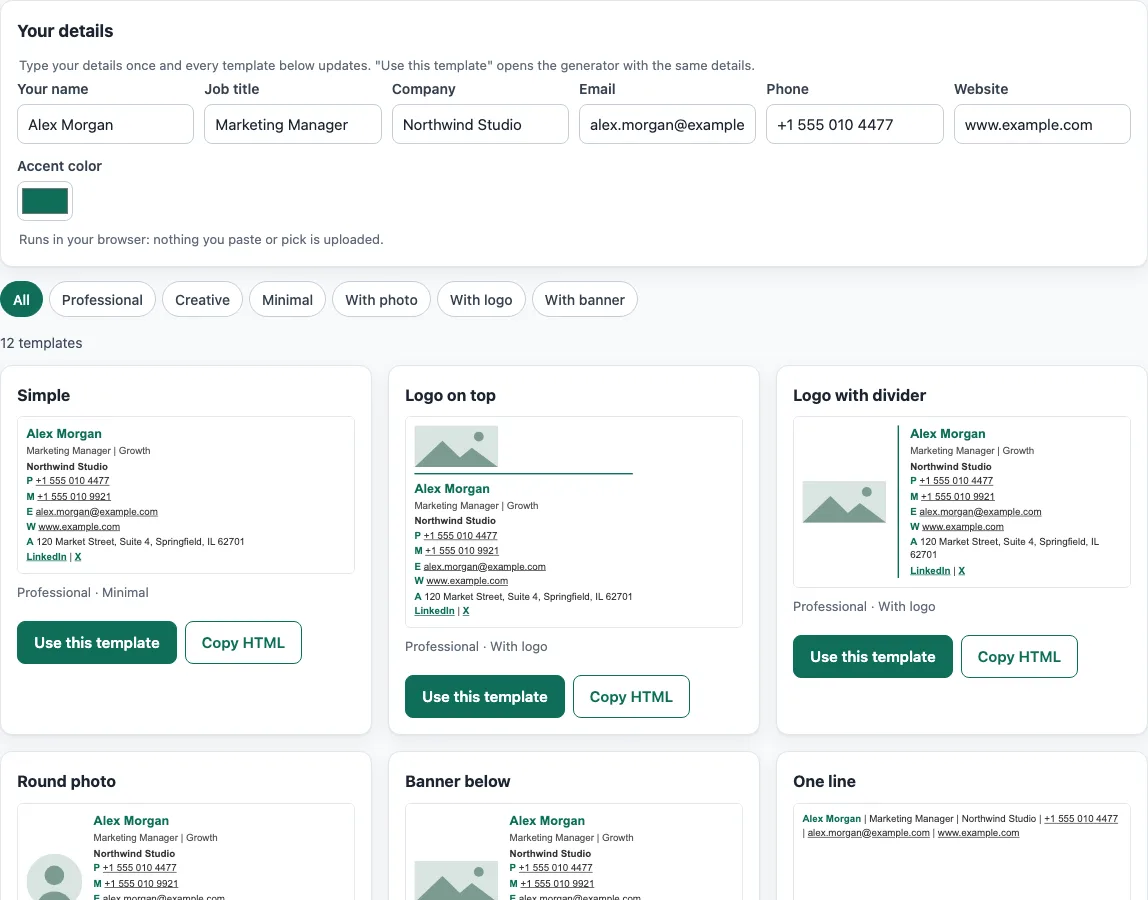
Type your name and company once to see every signature template with your details, then copy one or customize it in the generator.
Recent
Your last 10 settings, saved only in this browser. Nothing is uploaded.
This email signature template tool gives you 12 ready-made email signature templates that you can use for free. Pick a template, fill in your name, job title, company, email, phone, website and accent color, then copy the HTML into your email app.
The tool runs in your browser. There is no account or sign-up, and nothing you type or paste is uploaded. Use the filter chips to narrow the list to Professional, Creative, Minimal, With photo, With logo or With banner, so you can compare a free signature template for personal mail with a set of professional email signature templates for work.
How to use the email signature templates
Use these steps to turn an email signature block template into your own signature.
- Under Your details, type your name, job title, company, email, phone, website and accent color once. Every template below updates with your details.
- Click a filter chip (All, Professional, Creative, Minimal, With photo, With logo or With banner), or leave it on All.
- Scroll the cards and compare the templates with your own details in them.
- Click Use this template. The email signature generator opens with that template and your details loaded, where you can add the remaining fields, images and links.
- Replace each example image address with the address of your own hosted https image.
- In the generator, click Copy signature and paste it into your email app’s signature settings. Copy HTML on a card copies the raw code, for mail programs and tools that accept HTML.
- Find the signature settings in your mail program. In Outlook on the web or new Outlook, go to Settings > Accounts > Signatures > Add signature. In Apple Mail, go to Mail > Settings > Signatures.
Templates without a photo or logo work without any image hosting, so start with one of those if you have no image address yet.
Why is an email signature template built from tables?
Email apps handle page layout poorly, so templates use the HTML <table> element for structure. Every mail program in the caniemail data supports tables, which makes them the most dependable layout method for signatures. Every template uses inline styles only and has no <style> block, because Gmail does not support <style> inside the body and caps the block at 16 KB. Vertical alignment is supported everywhere, so it is applied to table cells to line up photos and text.
Which email apps show an html email signature template correctly?
Most features are widely supported, but a few limits matter. Outlook for Windows (2007-2019) applies padding only to table cells, and borders can be no more than 8px wide. Rounded corners, used only by the round-photo template, work in Gmail, Apple Mail and Outlook for macOS. In Outlook for Windows they work through VML, so expect a square photo there.
Why do templates use hosted https images?
Gmail rasterizes SVG files to PNG, and base64 images are only partly supported. Templates therefore point to hosted https images. The example addresses use www.example.com, a domain reserved for documentation by RFC 2606, so it is a safe placeholder that will never be a real image. Replace it with your own address. Width and height attributes are set so space is reserved while the image loads.
What text colors make an email signature template easy to read?
WCAG 2.1 success criterion 1.4.3 asks for a contrast ratio of at least 4.5:1 for normal text. The contrast ratio is (L1 + 0.05) / (L2 + 0.05), where L is the relative luminance of each color, with the lighter color as L1. Body text uses #333333, which gives 12.6:1 on white. Secondary text uses #595959, which gives 7:1. The band template chooses white or near-black text based on which one gives the higher contrast against the accent color.
How long can an email signature template be?
Gmail documents a limit of 10,000 characters per signature. The template HTML is about 2-3 KB before images, which leaves plenty of room for your details. Keep extra content short, because a long signature is harder to read on a phone.
Which signature template is best for my email?
No single template suits every case. Choose a Professional template for work email, a Minimal template for a short footer, and a With photo, With logo or With banner template when a face or brand should stand out. Preview two or three templates with your real details before you pick one.
Sources (checked 13 October 2026): Can I email · Can I email (2) · Can I email (3) · Google Support · IETF · W3C
Frequently asked questions
Is the tool free, and is anything I paste uploaded?
Yes, the tool is free, and there is no account or sign-up. Everything runs in your browser, so nothing you type, paste or open is uploaded. Signatures, footers, templates and images you make with the tools may be used for any purpose, including commercial use, without attribution.
Why do the example images show www.example.com?
www.example.com is a reserved example address, so it is a placeholder. Replace it with the address of your own hosted https image before you send any email.
Will the html signature template work in Outlook?
Templates are table-based with inline styles, so they are built for Outlook. Outlook for Windows (2007-2019) applies padding only to table cells and limits borders to 8px, and the round-photo template shows a square photo there.
Where do I paste the signature in Outlook on the web?
Go to Settings > Accounts > Signatures > Add signature, then paste the HTML.
Can I use the template in Apple Mail?
Yes. Plain tables work in Apple Mail, so go to Mail > Settings > Signatures and add your signature there.
How long can my signature be in Gmail?
Gmail documents up to 10,000 characters per signature. The template HTML is about 2-3 KB before images, so it fits well within that limit.
Does the tool check whether my emails reach the inbox?
No. The site does not send email, does not look up DNS records and cannot see sender reputation. Its checks only read what you paste or open.
Related tools
- Email signature generator - Use this to build a full signature from scratch with your own details.
- Company email signature generator - Use this when every person in your team needs a matching signature.
- Email signature logo tool - Use this to add or check a logo in your signature.
- Email signature dark mode check - Use this to see how your signature looks when the email app uses dark mode.
- Signature generator (handwritten) - Use this to create a handwritten-style signature image rather than an email block.
- Email footer generator - Use this to build a footer for the bottom of your emails, such as legal text or unsubscribe links.