Create Email Signature with Logo
Open your logo, choose how wide it should appear in the signature, and export a sharp image plus the HTML to use it.
Recent
Your last 10 settings, saved only in this browser. Nothing is uploaded.
To create an email signature with a logo, prepare the logo at the right size, host it at a public https address, and add an image tag that points to it. This free, browser-based tool does the first and last steps for you. You open a logo file, choose its display size and background, and the tool writes the image code you need to place the logo in a signature. Everything runs in your browser, so nothing you paste or open is uploaded, and there is no account or sign-up.
A logo in a signature is not just a picture you attach. Most email apps load the image from a web address, so the logo has to be hosted online first and the signature has to point to it.
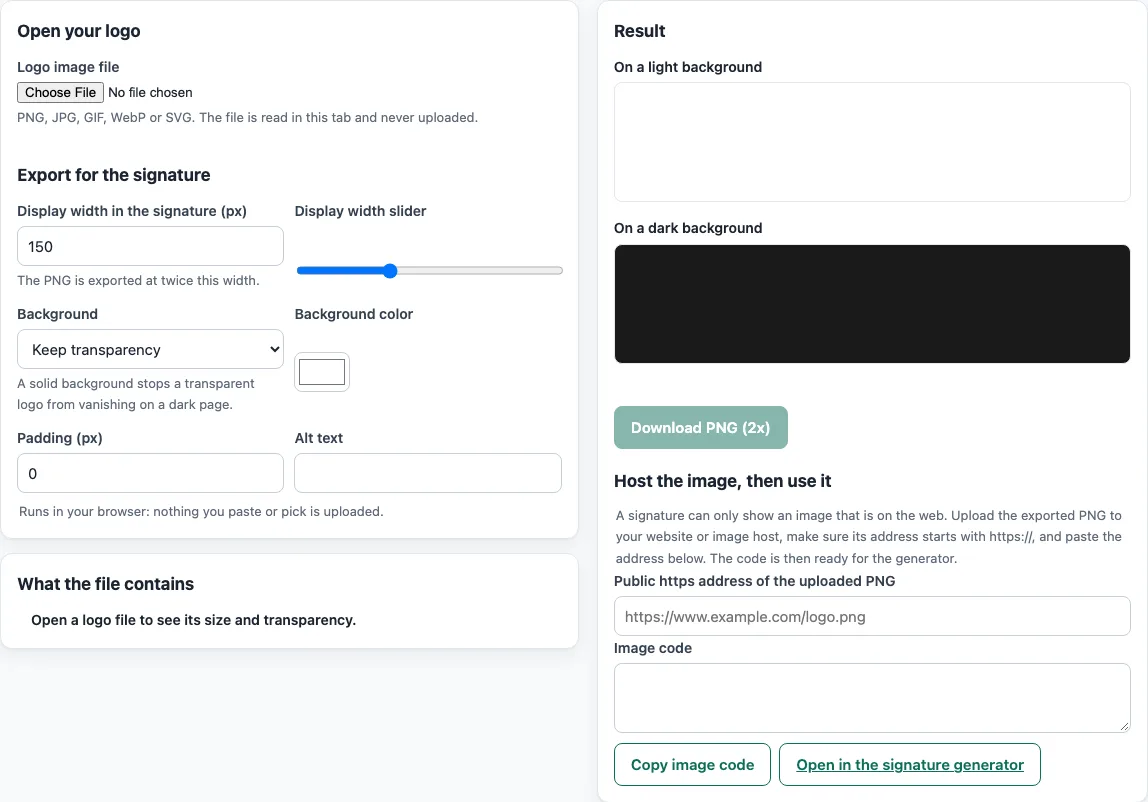
How to use the email signature logo tool
- Open your logo file. The tool accepts PNG, JPG, GIF, WebP and SVG, and reads the file on your device. It shows the pixel size, file size, type, aspect ratio and whether the file has transparency.
- Set the Display width with the number box or the slider. Keep it at 600 px or less, because the tool warns about wider images.
- Choose a Background: Keep transparency, White, or Chosen color. If your logo has transparent areas and you want it to look the same in dark mode, pick a solid color.
- Adjust Padding if the logo sits too close to the text.
- Enter Alt text. The generator uses your company name by default, so change it if the logo needs a more specific description.
- Check the preview on light and dark backgrounds.
- Click Download PNG (2x) and note the file size shown.
- Upload the PNG to a host that gives you a public https address, then paste that address into the Public https address field.
- Click Copy image code. The code includes width, height and alt. Or click Open in the signature generator to build the full signature with the logo already in place.
To finish, open Gmail’s Settings, go to Signature, and paste your signature there.
How do I make an email signature with a logo that shows in most apps?
Host the logo at a public https address and point an image tag at it. Email apps fetch the image from that address when the message is opened, so the address must be reachable. Embedded base64 images are only partly supported, and Outlook for Windows does not render base64 GIF files, so the tool asks for a hosted address.
Why should the logo be 600 px wide or less?
The tool caps the signature image at 600 px wide. This is a limit set by the tool, not a rule from an email provider, and it keeps the logo a sensible size inside a signature. Gmail counts the image toward its 10,000-character signature limit, and its help page suggests resizing the image if you see an error.
Why does my logo look blurry, and what does 2x export do?
The PNG is drawn at twice the display width, and the image tag sets width and height to the display size. On high-density screens, the browser has more pixels to draw from, so the edges look sharper. The tool exports PNG rather than SVG because Gmail converts SVG images to PNG, and not every client shows SVG.
Why might my logo disappear in dark mode?
Outlook.com and Outlook on the web change the default bright background to a darker color in dark mode, and Outlook adds data-ogsc, data-ogac, data-ogsb and data-ogab attributes to the message. A transparent logo with dark parts can then become hard to see. Microsoft’s “Turn on the lights” option shows the message’s original formatting. It is not documented whether a given client changes a transparent logo, so the tool’s dark-background warning is a heuristic: it flags a file when more than half of its visible pixels are very dark and the file has transparency. Choosing a solid background color avoids the problem.
Why should a logo have alt text?
Alt text describes an image for people who cannot see it, such as those using screen readers, and it appears if the image does not load. WCAG 1.1.1 (non-text content) asks that images have a text alternative. A short company name is usually enough for a logo.
Sources (checked 13 October 2026): Google Support · Can I email · Can I email (2) · Can I email (3) · Microsoft Support · W3C
Frequently asked questions
Is the tool free, and is anything I paste uploaded?
Yes, the tools are free, and there is no account or sign-up. Everything runs in your browser, so nothing you type, paste or open is uploaded. The logo still needs a public https address for the signature itself, which you host separately.
Can I use an SVG logo in my email signature?
You can open an SVG file in the tool, but it exports a PNG for the signature. Gmail rasterizes SVG images, and not every email client shows SVG, so PNG is the safer format.
Why does my logo not show for some recipients?
The logo is loaded from its web address when the email is opened, so it only appears when the reader’s mail program shows HTML and downloads remote images; some mail programs ask before loading pictures, and anyone reading in plain text will not see it. Check that the address opens in a private browser window.
Does the tool check whether my email reaches the inbox?
No. The site does not send email, look up DNS records or see sender reputation. Its checks only read the files and code you paste or open.
Can I use the signature I create for commercial purposes?
Yes. What the tools make, including signatures and images, may be used for any purpose, including commercial use, without attribution.
Related tools
- Email signature generator: build a full signature with your name, title and contact details.
- Email signature templates: start from a ready-made layout and add your logo later.
- Company email signature generator: create matching signatures for everyone at your company.
- Email signature dark mode check: see how a signature looks on dark backgrounds before you send it.
- Signature generator (handwritten): make a handwritten-style signature for documents or emails.
- Email footer generator: add legal lines, links or unsubscribe text below your message.