Email Signature Dark Mode Check
Paste your signature's HTML to see it in light mode and two dark-mode simulations, with the colors and images that need fixing.
Recent
Your last 10 settings, saved only in this browser. Nothing is uploaded.
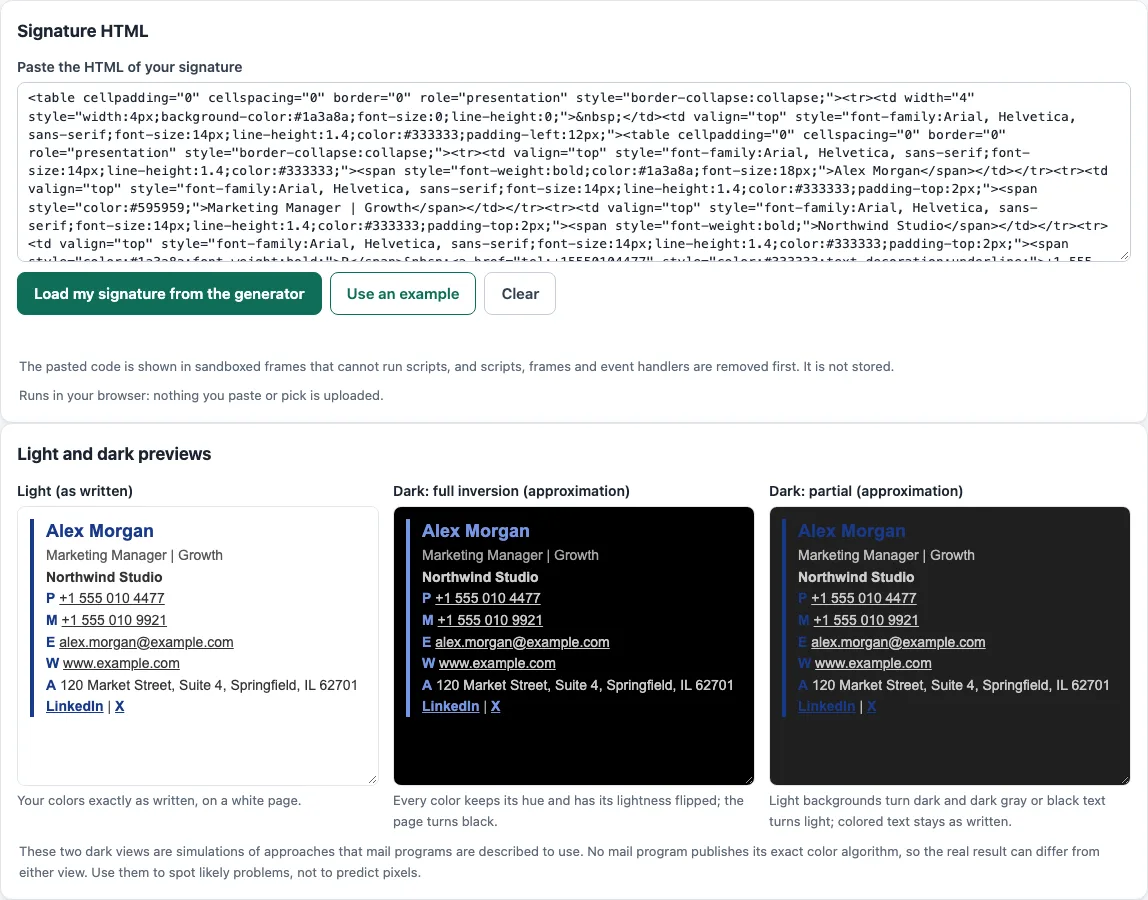
How to use the Email signature dark mode check
- To start with your own signature, select Load my signature from the generator. This reads the draft you saved in the generator in this browser.
- To try the tool first, select Use an example to load sample signature HTML.
- Paste your signature HTML into the paste box. To clear the box and start again, select Clear.
- Read the three previews: Light (as written), Dark: full inversion (approximation) and Dark: partial (approximation). Compare how text, backgrounds and images change between them.
- Review the checks. They look for low contrast in the light view and each dark view, hard-coded white backgrounds, images that may be transparent, missing color-scheme meta tags and use of
prefers-color-scheme. - Open the contrast tables for each view. Each row lists the text and colors, the contrast ratio and a Pass or Fail result.
- If your signature has a logo, select Check a logo file and choose the image. The check reports its transparency and darkness from the real pixels.
After you fix any failing rows in your HTML, paste the updated code and run the check again.
Check both dark previews, because a color that works in one approximation can fail in the other.
How does dark mode change an email signature?
Dark mode makes a mail program show a message on a darker background. Outlook on the web changes the default bright background to a darker color, and “Turn on the lights” in the reading pane shows the message’s original formatting. Because no mail program publishes its exact method, the two dark previews are labelled approximations. Full inversion keeps the hue and flips HSL lightness. Partial darkens light backgrounds with luminance above 0.6, lightens dark gray and black text, and leaves colored text as it is.
Which CSS can a signature use for dark mode?
The @media (prefers-color-scheme) query has only partial support in the caniemail data. In the caniemail data it works in Apple Mail, Outlook for Mac, Outlook.com and Samsung Email, but not in Gmail, Outlook for Windows, Yahoo Mail or Thunderbird. The color-scheme property is supported by even fewer mail programs. Its meta tag, <meta name="color-scheme" content="dark light">, tells the browser that the page accepts theme-specific defaults, so the browser does not apply its own color transformation. A signature is only a fragment of a message, so this tag belongs in the head of the whole message.
How much contrast does dark mode text need?
WCAG 2.1 success criterion 1.4.3 asks for a contrast ratio of at least 4.5:1 for normal text and 3:1 for large text, which means 18 pt or 14 pt bold. The ratio is (L1 + 0.05) / (L2 + 0.05), where L1 is the lighter color and L is relative luminance, calculated as 0.2126 R + 0.7152 G + 0.0722 B on linearized sRGB. Black on white gives 21:1. #767676 on white gives 4.54:1 and passes, while #777777 on white gives 4.48:1 and fails for normal text. Gray text that passes on white can fail once the background turns dark, so the tool checks each view separately.
Why can a transparent logo look wrong in dark mode?
caniemail lists PNG, GIF, WebP and SVG as formats that can carry transparency. The tool flags these images as “may be transparent” because the background behind a transparent area changes in dark mode. Dark parts of a logo can then become hard to see. The logo check reads the real pixels to report transparency and darkness.
Sources (checked 13 October 2026): Microsoft Support · Can I email · Can I email (2) · web.dev · W3C · W3C (2)
Frequently asked questions
Is the tool free, and is anything I paste uploaded?
Yes, the tool is free and there is no account or sign-up. Everything runs in your browser, and nothing you type, paste or open is uploaded.
Does dark mode change my signature the same way in every email app?
No. Mail programs apply their own methods, and no program publishes its exact one. Treat the two dark previews as approximations, and use Outlook’s “Turn on the lights” to see the original formatting when you test in Outlook.
Will my dark mode CSS work in Gmail or Yahoo Mail?
Not according to caniemail, which reports no support for @media (prefers-color-scheme) in Gmail, Outlook for Windows, Yahoo Mail or Thunderbird. Check the Light preview and the contrast tables so the signature still reads well in those apps.
Why does the tool flag a white background?
A hard-coded white background stays white in dark mode and can clash with the dark background around it. Consider removing the fixed color so the signature can follow the message background.
Can I load a signature I made in the generator?
Yes. Select Load my signature from the generator to read the draft saved in this browser. You can also paste HTML from any source.
Can I use the signatures I make here for business?
Yes. What the tools make, including signatures, may be used for any purpose, including commercial use, without attribution.
Related tools
- Email signature generator: create the signature HTML to test here when you are starting from scratch.
- Email signature templates: begin from a ready-made layout and then check its dark mode appearance.
- Company email signature generator: build matching signatures for a team when everyone needs the same layout.
- Email signature logo tool: prepare a logo before you run the transparency and darkness check.
- Dark mode email check: test a full email for dark mode problems, not only a signature.
- Email HTML validator: check the HTML structure when a signature looks wrong in some apps.