Email HTML Validator
Paste the HTML of an email, or open the file, to check size, CSS support, images, links and structure before you send.
Recent
Your last 10 settings, saved only in this browser. Nothing is uploaded.
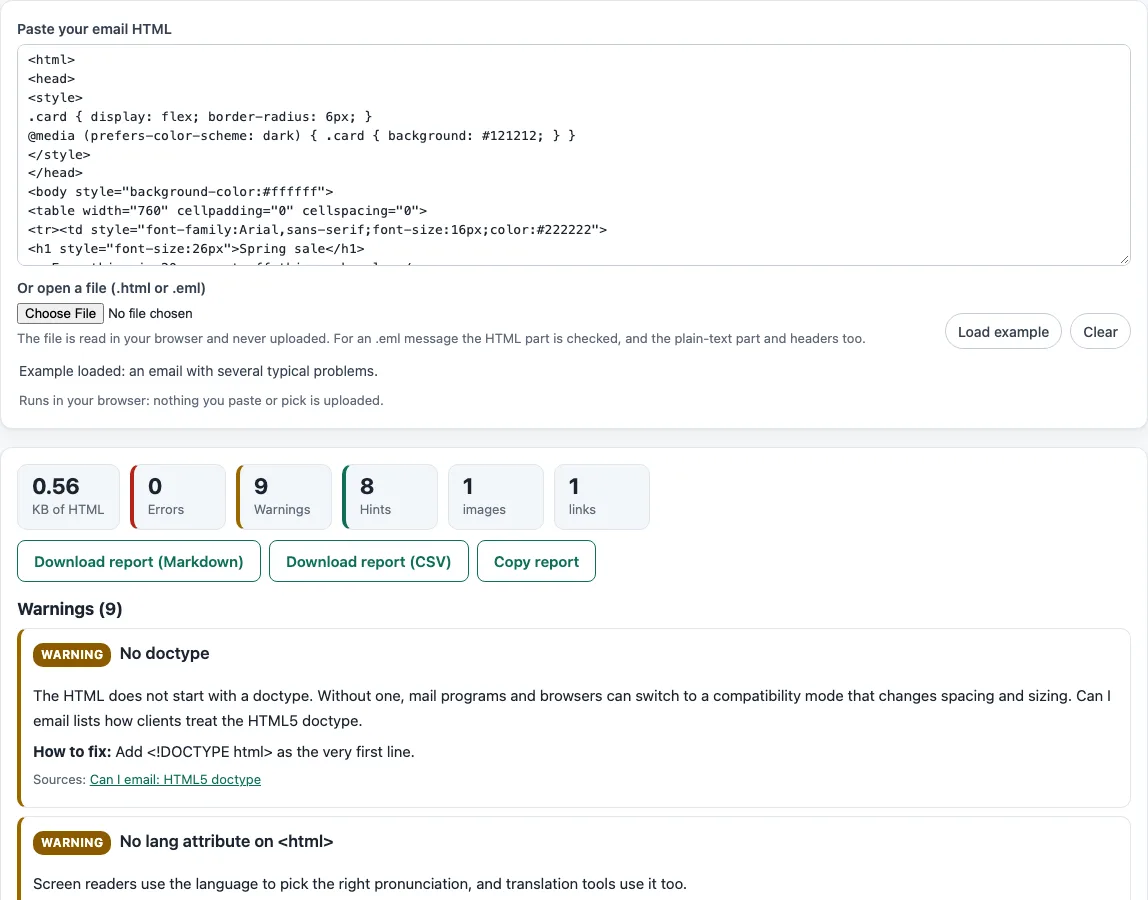
How to use the Email HTML validator
- Paste the HTML source of your email into the box labelled “Paste your email HTML”.
- Or select the file picker “Or open a file (.html or .eml)” and choose your file.
- If you want to see how the tool works first, select “Load example”.
- For an .eml file, the tool reads the MIME structure and decodes base64 or quoted-printable text and the character set. It checks the HTML part, and it also uses the text/plain part and the List-Unsubscribe header.
- Read the tiles at the top: KB of HTML, Errors, Warnings, Hints, images and links.
- Go through the findings, which are grouped by severity. Each one includes an explanation, “How to fix”, line numbers, example snippets and source links.
- Check the table “Support of the features found” to see how the features in your email fare across the nine mail program families.
- Review the “Checks passed” list so you know what the tool did not flag.
- Select “Clear” to empty the box and start again.
The report can be saved or copied with the buttons “Download report (Markdown)”, “Download report (CSV)” and “Copy report”. Use the Markdown version for notes and the CSV version for a spreadsheet.
Why does Gmail clip long emails?
Gmail cuts off long messages and shows a “View entire message” link. This is widely reported to happen at about 102 KB of HTML. Google does not publish this limit, so treat the figure as a guide rather than a rule. The tool counts only the HTML you paste, so the KB tile is a useful size check for that part of the message.
Why does Outlook for Windows break some HTML?
Outlook for Windows renders email with the Word engine, which supports only part of HTML and CSS. Microsoft’s documentation, written in 2006, lists elements such as applet, form, iframe, script and video-related tags as unsupported. It also lists CSS such as float, position, max-width, min-height and z-index as unsupported. Frameset and frame are blocked for security reasons. Feature data from Can I email indicates that Outlook versions from 2007 to 2019 use this engine.
How does the color contrast check work?
The check compares the text color with its background using WCAG 2.1 contrast rules. Normal text needs a ratio of at least 4.5:1, and large text (18 point, or 14 point bold) needs at least 3:1. Relative luminance is calculated as L = 0.2126 R + 0.7152 G + 0.0722 B, using linearized channel values, and the ratio is (L1 + 0.05) / (L2 + 0.05). The tool checks inline colors only and assumes a white background when none is set. It ignores hidden preheader text.
The line numbers in each finding refer to the HTML exactly as you pasted it, so you can jump to the same line in your editor and fix it there.
Fix errors first, because they are the findings most likely to break the layout or hide content; warnings and hints can wait until the email works everywhere you test it.
Run the validator again after each round of fixes; the counts in the tiles show at a glance whether the email is getting cleaner.
Sources (checked 13 October 2026): help.drip.com · GitHub · GitHub (2) · Can I email · [Microsoft Learn](https://learn.microsoft.com/en-us/previous-versions/office/developer/office-2007/aa338201(v=office.12) · Can I email (2)
Frequently asked questions
Is the tool free, and is anything I paste uploaded?
Yes, the tool is free, and there is no account or sign-up. Everything runs in your browser, and nothing you paste, type or open is uploaded. The same applies to .eml files, which are read on your own device.
Does the tool tell me whether my email will reach the inbox?
No. The site does not send email, does not look up DNS records and cannot see sender reputation. The checks only read the HTML you paste or open.
How current is the feature support data?
The data is a snapshot from 2026-10-13 from caniemail, which is MIT licensed and copyright Remi Parmentier. It groups 136 features into nine mail program families, and the upstream repository’s latest commit is dated 2026-09-16. Mail programs change, so check the latest data before you rely on a specific result.
Is a hint the same as an error?
No. Hints cover features that the tool judges as usually cosmetic, such as border-radius, box-shadow, hover effects and transitions. Hints are shown only at the “Hint” severity, so they are unlikely to affect how the email looks in most programs.
Does the tool check my unsubscribe link against the law?
It only checks for an unsubscribe hint. The FTC’s CAN-SPAM guide says the “primary purpose” of a message decides which rules apply, and commercial messages need an opt-out and a valid physical postal address. The law makes no exception for business-to-business email, and penalties can reach $53,088 per violating email, as updated in January 2024. This hint is not legal advice.
Related tools
- Email template size calculator: use it to estimate the size of a template before you paste its HTML here.
- HTML email builder: use it when you need to create the HTML for an email from scratch.
- HTML email templates: use them as a starting point if you want a base layout to check.
- Email spam checker: use it when you want to review the content of a message for spam signals.
- Spam word checker: use it to look at individual words that may affect how a message is filtered.