Email Footer Generator
Enter your company details, unsubscribe link and legal text to get a newsletter footer as HTML and plain text.
Recent
Your last 10 settings, saved only in this browser. Nothing is uploaded.
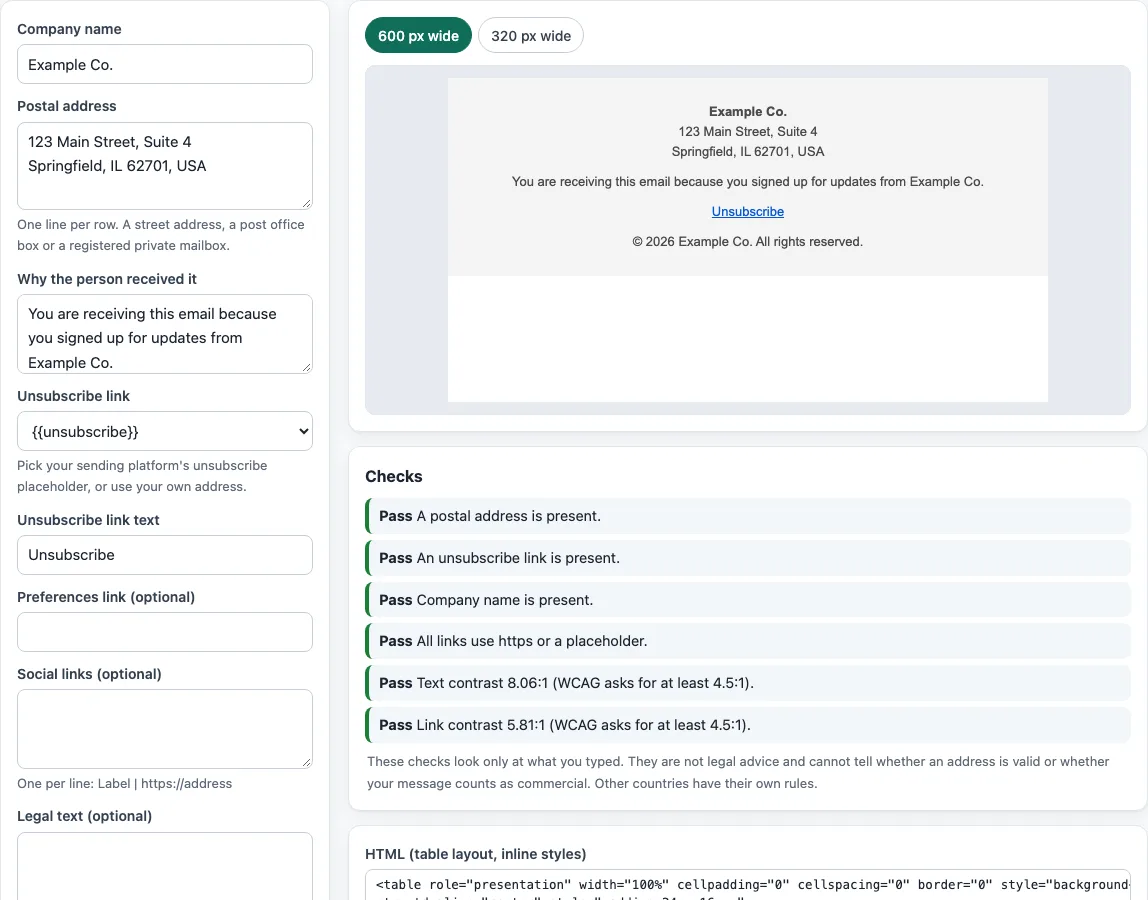
How to use the Email footer generator
- Type your company name in Company name.
- Enter your Postal address. Use your current street address, a post office box registered with the U.S. Postal Service, or a private mailbox registered with a commercial mail receiving agency.
- In Unsubscribe link, pick a placeholder from the list or paste your own URL.
- In Why you received this, write a short reason, such as “You signed up on our website.”
- If you have a page where people manage their emails, add it under Preferences link.
- In Social links, enter one link per line in the format
Label | URL, for exampleInstagram | https://example.com/instagram. - Write your Legal text and your Copyright line.
- Set Text color, Background color and Link color, then choose an Alignment. Read any contrast warning before you continue.
- Check the preview at 600 px and 320 px to see how the footer looks on a desktop-width and a phone-width screen.
- Use Copy HTML to paste the code into an HTML email, Copy text for the plain-text version, or Download .html to save a file.
Fill in every required item before you copy. The checks flag a missing address, a missing unsubscribe link, a missing company name, http links and low text contrast. Use the plain-text version for any email that does not support HTML.
What must an email footer include under CAN-SPAM?
CAN-SPAM is a U.S. law, and the FTC’s compliance guide sets out the core duties for commercial email. A commercial message must include a clear and conspicuous explanation of how the recipient can opt out, and a return email address or another easy internet-based way to do so. It must also include your valid physical postal address and clearly disclose that the message is an advertisement. Your header and subject line must not be misleading.
The guide also sets rules for handling opt-outs. You must honor a request within 10 business days, and the opt-out method must keep working for at least 30 days after you send the email. You cannot charge a fee or ask for more than an email address. If you offer a menu of email choices, one option must stop all commercial messages from you. A company that hires another business to send its email is still responsible for compliance. The guide lists fines of up to $53,088 for each separate non-compliant email, the inflation-adjusted figure the FTC page has shown since its January 2024 edit.
The guide treats transactional and relationship messages differently from commercial ones. This tool does not decide which type your email is. Other countries have their own rules, and this page does not cover them.
How do I check whether footer text is readable enough?
Footer text should reach a contrast ratio of at least 4.5:1 against its background, following WCAG 2.2 success criterion 1.4.3 at level AA. Large text, meaning 18 pt or 14 pt bold, needs at least 3:1. Logotype text is exempt.
The ratio is calculated as (L1 + 0.05) / (L2 + 0.05), where L1 is the lighter color’s relative luminance and L2 is the darker one. Relative luminance is 0.2126R + 0.7152G + 0.0722B, using linearized sRGB values. Each channel is divided by 12.92 when it is 0.04045 or lower, and otherwise converted with ((c + 0.055) / 1.055)^2.4. The result runs from 1 to 21.
A common mistake is light gray text. Gray #999 on white is about 2.8:1, which fails. The lightest gray that passes on white is #767676, at 4.54:1.
Why does the footer use a table with inline styles?
Email clients display HTML differently, so the footer uses a table layout. Table layout works in every mail program listed in the caniemail data. Inline styles attach the formatting to each element, so the footer keeps its look when the email client ignores page-level styles.
The footer sets both width="600" and max-width. The width attribute is broadly supported, but Outlook for Windows 2007 to 2019 is listed as partial, because sizes do not scale correctly in 120 dpi mode. The max-width property is not supported in Outlook 2007 to 2016, and only partly works in Outlook 2019, where it applies to table elements. Setting both values covers the widest range of clients.
Sources (checked 13 October 2026): FTC · W3C · W3C (2) · Can I email · Can I email (2) · Can I email (3)
Frequently asked questions
Is the tool free, and is anything I paste uploaded?
Yes, the tool is free and has no sign-up. Everything runs in your browser, so nothing you type, paste or open is uploaded. The site also does not send email, look up DNS records or see your sender reputation. The checks only read what you put into the tool. You may use the output for any purpose, including commercial use, without credit.
Does the email footer generator send my email for me?
No. The site does not send email. It builds the footer code and plain text for you to copy or download, and you send the email through your own software.
Can I use the footer in commercial emails?
Yes. You may use the output for any purpose, including commercial use, without attribution.
Will a footer from this tool make my emails CAN-SPAM compliant?
Not on its own. The tool helps you include the required items, but the checks only read what you paste in. You still need to send email that meets the law, including honoring opt-outs.
Why does the check say my postal address is missing?
The Postal address field is empty or was not detected. Enter your current street address, a USPS-registered post office box, or a registered private mailbox.
Can I add more than one social link?
Yes. Enter each link on its own line in the format Label | URL.
Does the tool check whether my sending domain is trusted?
No. The site does not look up DNS records or see sender reputation, so it cannot make that check.
Why are my http links flagged?
The checks flag http links because they should use https. Replace each http address with its https version before you copy the footer.
Related tools
- Email signature generator for building a signature block to go above your footer.
- Signature generator for a handwritten-style signature.
- Email signature templates when you want a ready-made layout to start from.
- Email signature logo tool for preparing a logo to include in your footer or signature.
- HTML email templates for full email layouts that already include a footer.
- HTML email builder when you want to assemble a complete email, not just the footer.
- Email spam checker for reviewing your email text before you send it.
- Email banner size calculator for sizing header or promotional banners.