Email Font Size Preview
Compare web-safe fonts and text sizes on desktop and phone widths, then copy the styles for your email's body text and headings.
Recent
Your last 10 settings, saved only in this browser. Nothing is uploaded.
Email font size is the text size you set for the body and headings of an email, and this tool helps you pick one and see how it looks. Choose a font, a size from 12 to 24 px, a line height, a heading scale and a text color, then check the sample paragraph at desktop and phone widths. It runs in your browser, is free, and needs no sign-up.
There is no single best email font size for every message. A size that looks right on a laptop can feel small on a phone, so this page shows both views before you commit. The same preview also helps you settle on a professional email font and size for newsletters, signatures and everyday messages.
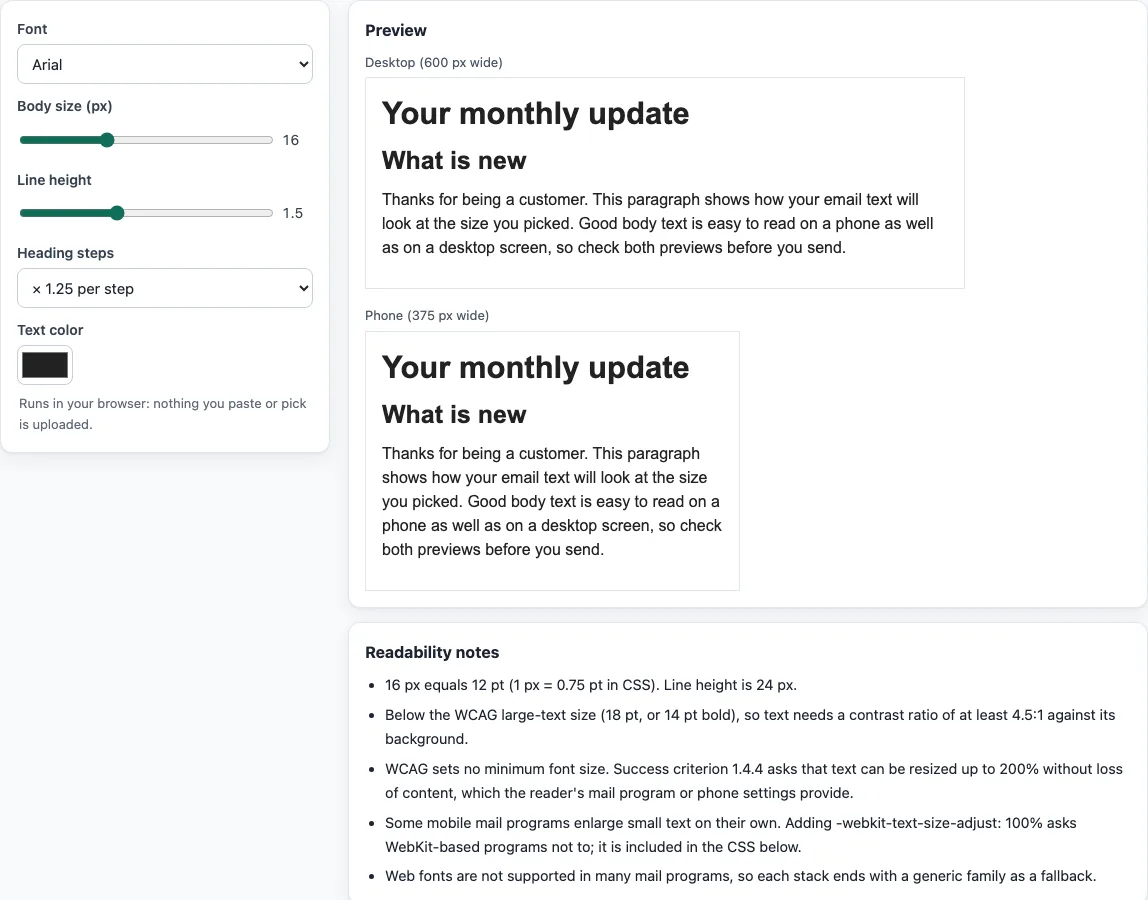
How to use the Email Font Size Tool
- Open the Font control and choose a font for your email text.
- Set Size between 12 and 24 px. This sets your body text size.
- Adjust Line height so lines of text are not cramped.
- Set Heading scale to control how large your headings are compared with the body text.
- Pick a Text color.
- Check the sample paragraph in the desktop preview, then switch to the phone-width preview.
- Read the readability note, which gives the point (pt) equivalent of your size and the WCAG large-text class it falls into.
- Click Copy next to the CSS or inline-style snippet for the body or the headings, then paste it into your email code.
To change the font and size that your own mail program uses for new messages, use its settings. In Gmail, open Settings, then See all settings, and edit the “Default text style” section. In classic Outlook, go to File, Options, Mail, then Stationery and Fonts. In new Outlook for Windows, go to View, Settings, Mail, then Compose. In Apple Mail on a Mac, go to Mail, Settings, then Fonts & Colors.
Change one setting at a time and compare the desktop and phone previews side by side; the copied snippet always matches what the preview shows.
What is the best email font size?
There is no fixed number, but the size should be comfortable to read on both a desktop and a phone. Web browsers show normal text at 16 px unless a page sets another size, which makes 16 px a reasonable starting point for body text. Preview your choice at phone width before you settle on it, and adjust the size and line height until the paragraph reads easily.
How do pixels and points relate to email font size?
In CSS, 1 inch equals 96 px, which equals 72 pt. So 1 pt equals 4/3 px, and 1 px equals 0.75 pt. A 18 pt size is 24 px, and a 14 pt size is about 18.67 px. The readability note converts your size for you, so you can compare it with print sizes.
Which font size counts as large text under WCAG?
Under WCAG 1.4.3, large-scale text is at least 18 pt, or 14 pt in bold. Large text needs a contrast ratio of at least 3:1 against its background. Other text needs 4.5:1. WCAG 2.2 SC 1.4.4 (Resize Text) sets no minimum font size. It requires that text can be resized up to 200 percent without losing content or function, so a size that passes the contrast rule still needs to be checked for readability.
How do line height and heading scale work?
A unitless line-height value multiplies the element’s font size, so a value of 1.5 on 16 px text gives a line height of 24 px. The heading scale works as body size multiplied by the ratio raised to a power. For example, with a 16 px body and a ratio of 1.25, the first heading level is 20 px and the next is 25 px. This is a convenient way to space headings, not a web or email standard.
Why does email font size look different on phones?
Phones are narrow, so the phone-width preview shows how your text wraps and scales. CSS text-size-adjust lets an author hint whether a browser should enlarge text on small screens, and its initial value is auto. Apple’s older Safari guide describes -webkit-text-size-adjust for iOS, where none turns the adjustment off. Email apps handle this differently, so check the phone preview and send yourself a test message.
Which professional email font and size should I use?
Web fonts loaded with @font-face are not supported in many email clients, so use a font stack with a generic fallback, such as Arial, Helvetica, sans-serif. According to caniemail, the font-size property is fully supported in Apple Mail, Gmail, Outlook.com and Thunderbird. It is only partly supported in Outlook for Windows 2013 to 2021, Yahoo, AOL and Samsung Email, so keep the size clear without depending on exact pixel rendering.
Sources (checked 13 October 2026): W3C · W3C (2) · W3C (3) · drafts.csswg.org · developer.apple.com · Can I email
Frequently asked questions
Is the tool free, and is anything I paste uploaded?
Yes, the tool is free and needs no account or sign-up. Everything runs in your browser, so nothing you type, paste or open is uploaded.
Does the tool send my email or check whether it reaches the inbox?
No. The site does not send email, look up DNS records or see sender reputation. Its checks only read what you paste or open.
Can I use the code this tool creates on a business email?
Yes. What the tools make, including signatures, footers, templates and images, may be used for any purpose, including commercial use, without attribution.
Does a font size that passes WCAG guarantee readable email?
No. WCAG 2.2 sets no minimum font size, and its contrast rules only cover color contrast. Preview your email at phone and desktop widths and test it in the apps your readers use.
Should I set email font sizes in px or pt?
Use px in the email’s CSS: it is the unit web rendering works in, and 1 px equals 0.75 pt, so 16 px is 12 pt. The readability note shows both values for the size you pick, which helps when a style guide is written in points.
Does a bigger font size make an email longer to download?
No. Font size is one line of CSS, so it does not change the size of the HTML in any way that matters. Larger text only makes the email longer to scroll.
Related tools
- Email banner size calculator: use it when you need to size a header or banner image to match your email layout.
- Email template size calculator: use it to choose a width for the main content area of your email template.
- HTML email builder: use it when you want to build an email layout and add your text styles.
- HTML email templates: use them when you want a starting layout to adapt rather than building from scratch.
- Email HTML validator: use it to check the HTML in your email before you send it.
- Email signature generator: use it to create a signature with your chosen font and size.