Email Banner Sizes Calculator
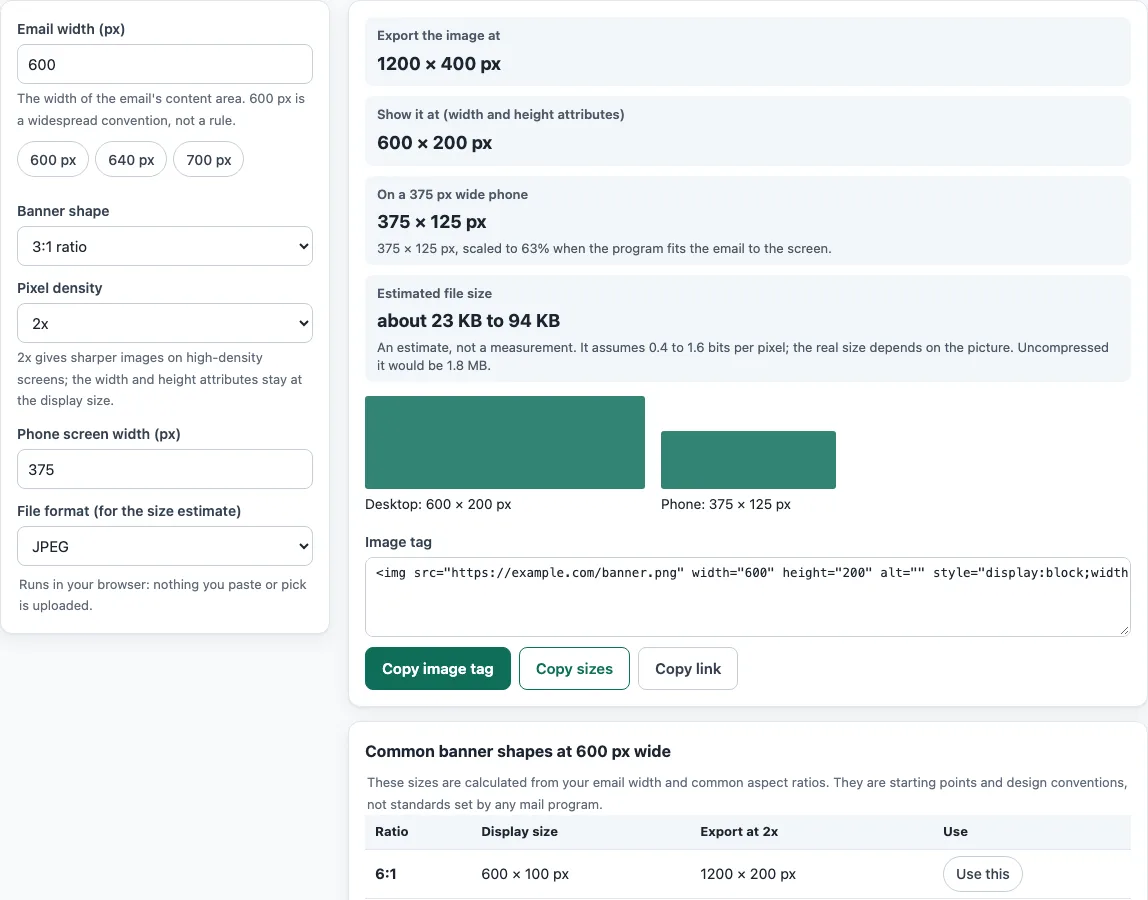
Choose the width of your email and the shape of the banner to get the exact image size to export and the HTML attributes to use.
Recent
Your last 10 settings, saved only in this browser. Nothing is uploaded.
Email banner sizes follow from the width of your email: a full-width banner is as wide as the email’s content area, and its height comes from the shape you choose. This email banner size calculator gives you the pixel dimensions to export for that banner. Enter your email width, then a banner height or aspect ratio, and the tool returns the image pixels to export, the display size for the width and height attributes, and a ready-to-use img tag. It runs in your browser and is free to use.
The tool also builds a reference table of sizes for common aspect ratios, computed from the email width you enter, so you can compare options side by side. No mail program sets one fixed width, so the width you choose is a design decision, and the tool shows you the numbers that follow from it.
How to use the Email banner size calculator
- In the Email width (px) field, enter the width of your email content in pixels. Many designers start with 600 px, but that is a convention, not a requirement.
- In Banner height (px), enter a height. Or choose an Aspect ratio instead if you want the height worked out from the width.
- Select a Pixel density of 1x, 2x or 3x. Pick 2x if you want sharper images on high-resolution screens.
- In the Phone width field, enter the width of the phone screen you want to preview. The tool then shows the phone scaling.
- Read the results. The output shows the image pixels to export, the display size for the width and height attributes, the phone scaling, an estimated file size, and the ready img tag.
- Compare other ratios in the reference table if your first choice does not fit.
- To check a finished file, use Check my image. Open the file, and the tool reports its pixels, its actual file size, and whether it matches your target.
The reference table and the results update from the values you enter. Nothing needs to be saved or sent anywhere before you copy the output.
Is there a standard email banner size?
No. Google Gmail Help, Microsoft Support and Apple Support do not state an email width, so no official standard exists. The 600 px width is a widespread design convention, and the tool calls it that. Your banner size is therefore a choice you make based on your email layout and your audience’s screens.
How do pixel density and display size work?
The HTML Standard says the width and height attributes on an img give the dimensions of the visual content in CSS pixels, and they are not meant to stretch the image. The image file can contain a different number of pixels than those CSS pixels. A 2x image has twice the pixels in each dimension, but it is still displayed at the same CSS size, so the width attribute stays the same.
When you set both width and height, they must match the image’s natural aspect ratio within a 0.5 tolerance, or both must be 0. If they do not match, the banner looks stretched or squashed.
How big will the file be?
Raw image size is exact arithmetic: pixels multiplied by 4 bytes for RGBA. Compressed size depends on the content, such as flat color or photographs, so the tool shows an estimated range. The bits-per-pixel presets behind that range are planning assumptions, and the tool labels them as estimates.
Which image formats work in email?
PNG and JPG are supported in mail clients tested on caniemail. WebP is partially supported, since some clients convert it to JPG and webmail depends on the browser. Linked SVG is partial, and animated GIFs are limited in some versions of Outlook. Media queries are also only partly supported, so a banner that relies on them may not scale in every client.
Whatever size you pick, give the banner image alt text that says what the banner says, because the words in an image are invisible when the image does not load.
Sources (checked 13 October 2026): HTML Standard · Can I email · Can I email (2) · Can I email (3) · MDN · HTML Standard (2)
Frequently asked questions
Is the tool free, and is anything I paste uploaded?
Yes, the tool is free. Everything runs in your browser, so nothing you type, paste or open is uploaded, and there is no account or sign-up.
What width should my email banner be?
No mail program fixes an email width. 600 px is a widely used convention, so start there if you have no other constraint, then test the result in the email clients your readers use.
Should I export a 2x image?
A 2x image has twice the pixels in each dimension, so it looks sharper on high-density screens. The display size stays the same, but the file is larger, so check the estimated file size before you choose it.
Why does my banner look stretched?
The width and height attributes must match the image’s aspect ratio. Set them to the display size from the tool’s output, not the pixel size of the file.
What should I add in case the banner does not load?
Some mail programs do not load images until the reader allows it. Add alt text to describe the banner, and set a background color so the layout still looks intentional when the image is hidden.
Which image format should I use?
Use PNG or JPG for the widest support. Avoid relying on animated GIFs or WebP unless you have tested them in the clients your readers use.
Related tools
- Email footer generator: create a footer to place beneath your banner and main content.
- HTML email templates: start from a ready-made layout that you can adapt.
- HTML email builder: assemble an email layout visually before you export it.
- Email spam checker: scan the text of your email for common spam signals you paste in.
- Email signature generator: build a signature to add below your email.
- Email template size calculator: check the size of your HTML template against common limits.
- Email font size preview: see how text sizes look before you send.
- Email HTML validator: check your HTML for structural errors.