Company Email Signature Template for Teams
Set the company design once, paste the team list from a spreadsheet and copy or download a signature for every person.
Recent
Your last 10 settings, saved only in this browser. Nothing is uploaded.
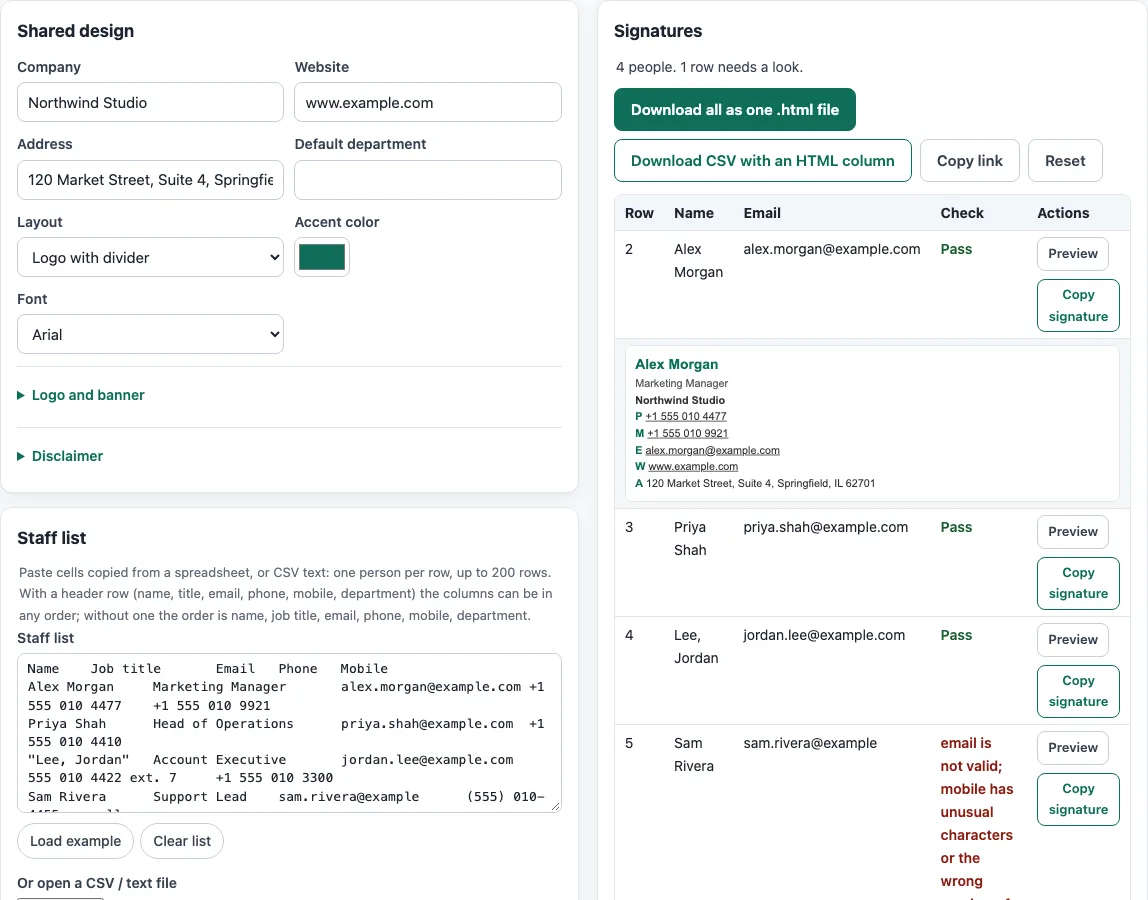
How to use the company email signature generator
- Fill in the shared design fields: Company, Website, Address and Default department.
- Choose a Layout, then pick an Accent color and a Font.
- Add logo or banner image addresses if you have them, and paste your Disclaimer text.
- Build the staff list by pasting rows from a spreadsheet or CSV, or by opening a file. The header row is detected automatically. The list holds up to 200 rows. Use Load example to try sample data, or Clear list to start again.
- Read the row checks. They flag a missing name or email, an invalid or duplicate email, and odd phone numbers.
- Click Preview on a row to see its signature, then click Copy signature to copy it.
When the list is ready, choose Download all as one .html file to get one section per person, or Download CSV with an HTML column to keep the data in a spreadsheet. Copy link saves the design only, because the staff list is never saved or put in the link. Reset starts the tool over.
Fix any row the checks flag, for example a missing email address, then preview that person again. Rows with problems are still built, so a typo does not stop the rest of the team.
How should I format a staff list so it pastes correctly?
A staff list pastes correctly when each row is one record, fields are separated by commas, and any field containing a line break, double quote or comma is wrapped in double quotes (RFC 4180, section 2). A double quote inside a quoted field is written as two double quotes, so the field "b""bb" holds the text b"bb. The first line may be a header row in the same format as the others, and the tool detects it. Cells copied from a spreadsheet arrive tab-separated instead, and the tool detects a tab in the first line.
Why do some phone numbers show as plain text?
A tel: link only works with a clean number, so the tool removes spaces and brackets from the link. RFC 3966 allows only hyphens, dots and brackets as separators, forbids spaces, and expects global numbers to start with +. A number with fewer than 5 or more than 15 digits is shown as text only. The 15-digit ceiling is this tool’s own limit, because the RFC text does not state one. A literal % in an email address is encoded as %25 in mailto: links (RFC 6068).
Why does a signature look different in Gmail or Outlook?
Gmail does not use a <style> block in the email body, so each element in a signature carries its own inline styles. Gmail documents a limit of 10,000 characters per signature, so a long disclaimer can push a signature over that limit. Outlook for Windows applies padding only to table cells, which is why each signature is built from tables. Send a test to yourself in the app your team uses before you roll the signature out.
Host the company logo once at a public https address and use that same address for every person, so every signature points at one image and a new logo only has to be uploaded once.
Sources (checked 13 October 2026): IETF · IETF (2) · IETF (3) · Can I email · Google Support · Microsoft Support
Frequently asked questions
Is the tool free, and is anything I paste uploaded?
The tool is free, and it needs no account or sign-up. Everything runs in your browser, so nothing you type, paste or open is uploaded to the site. The site does not send email, look up DNS records or see sender reputation; its checks only read what you paste or open.
How do I add the signature in Outlook?
Go to Settings > Accounts > Signatures > Add signature, paste the copied signature, choose your defaults, and select Save. Each person needs to paste their own signature.
How do I add the signature in Apple Mail?
Open Mail > Settings > Signatures, create a new signature, and paste the copied signature into it.
Can my company use these signatures commercially?
Yes. What the tools make, including signatures, footers and templates, may be used for any purpose, including commercial use, without attribution.
What if my staff list has more than 200 people?
The list holds up to 200 rows, so split a larger list into batches of 200 or fewer and work through each batch.
Does the tool check whether my emails will reach the inbox?
No. The site does not send email, look up DNS records or see sender reputation. Its checks only look for problems in the rows you paste or open, such as a missing name or an invalid address.
Related tools
- Email signature templates: use this when you want to start from a ready-made layout before you add your own details.
- Email signature logo tool: use this when you need to prepare or place a logo in your signature.
- Email signature dark mode check: use this to see how your signature may look when the recipient’s app uses dark mode.
- Signature generator (handwritten): use this when you want a handwritten-style signature rather than a company layout.
- Email HTML validator: use this to check the HTML of a signature you have pasted in.