Email Signature Generator
Fill in your details, choose a layout and copy the finished signature straight into your mail program, or download the HTML.
Recent
Your last 10 settings, saved only in this browser. Nothing is uploaded.
Next step
Before you roll the signature out, look at its HTML at phone width and in dark colours.
Shows pasted HTML in Chromium at 600, 375, 320 or 800 px, in light or dark colours. It does not imitate Gmail or Outlook.
Preview the HTML at phone width →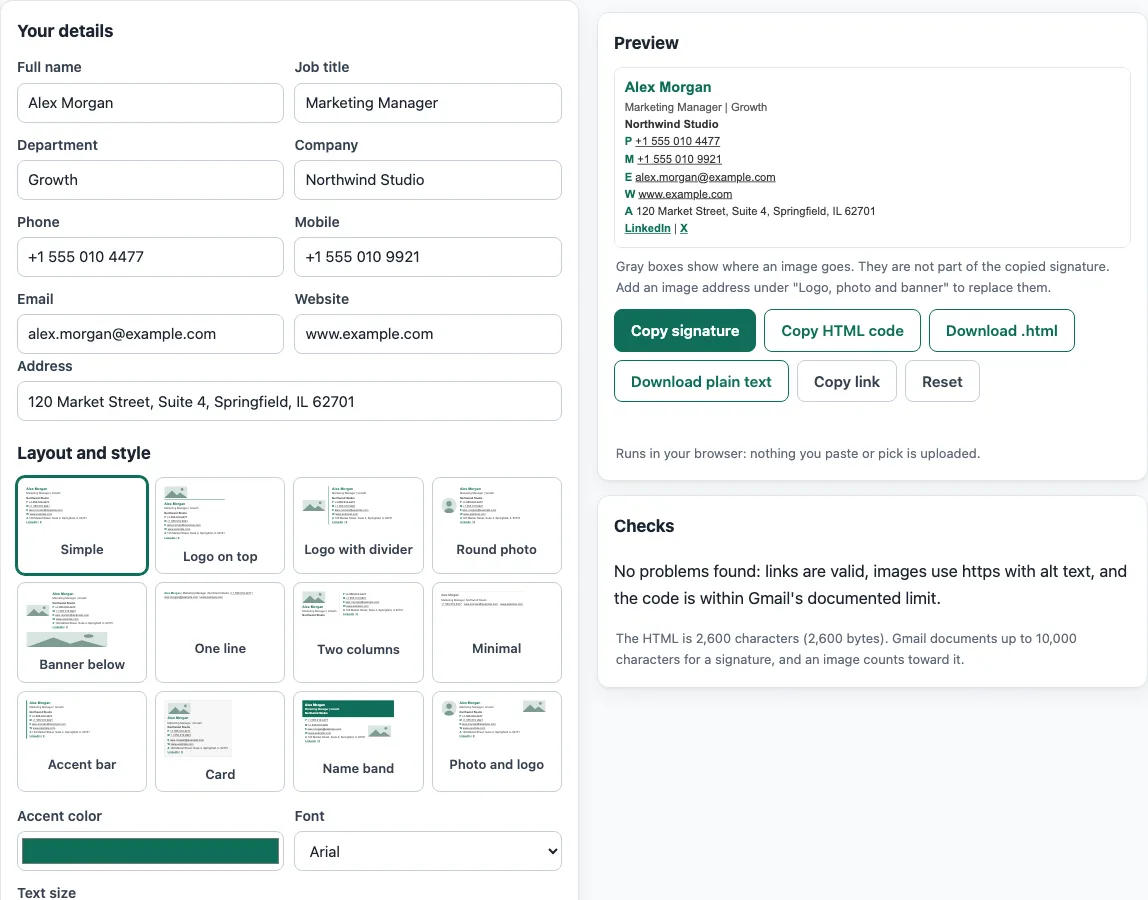
How to use the email signature generator
- Choose one of the 12 layouts. Each has a live thumbnail, so you can see its shape before you fill anything in.
- Enter your details: Full name, Job title, Department, Company, Phone, Mobile, Email, Website and Address. Leave any field blank if it does not apply.
- Add images if you want them. For a logo, photo or banner, enter the image address, then set its size and alt text.
- Add up to 5 links.
- Add a Disclaimer if your organization needs one.
- Set the Accent color, Font and Text size.
- Open the Checks panel and fix anything it flags, such as a non-https image, missing alt text, or a signature longer than Gmail’s 10,000-character limit.
- Click Copy signature to copy the rich HTML and plain text versions. Use Copy HTML code for the raw code, or Download .html or Download plain text to save a file.
- Open the “How to add it” tab for Gmail, Outlook, Apple Mail or Thunderbird and follow the steps shown there.
Click Copy link to get a link that stores your details in the ?s= part of the address, so you can reopen the same signature later. Reset brings back the example signature and clears the saved draft. Your draft stays saved in this browser’s localStorage, so it is still there when you return on the same device.
Why does the generator use tables and inline styles?
Email apps read HTML differently from web browsers, so a simple base works best. The generator uses table layout because <table> is supported by every client in the caniemail data. Gmail desktop does not support a <style> block inside the body and limits it to 16 KB. A signature sits in the body, so the generator writes styles inline on each element.
Spacing and borders need care too. Outlook for Windows (2007-2019) supports padding only on table cells, and it gives every cell in a row the largest vertical padding. It also cannot draw a border bigger than 8px and is unreliable on <p> and <div>. For that reason, the generator uses table cells for spacing. Background color and border-collapse are supported across the listed clients.
Why does the signature use https image links instead of embedded images?
Images need to be hosted online and referenced by an https address. Outlook for Windows does not render base64 GIFs, and Gmail converts SVG files to PNG. For that reason, the generator uses https image URLs only. Upload your logo to a web location you control, then paste its address into the image field.
What does Gmail’s 10,000-character limit mean for my signature?
Gmail documents a limit of up to 10,000 characters for a signature, and an image counts toward that limit. Long disclaimers, many links and large images all add up. The Checks panel measures your signature against this limit, so you can trim it before you paste it.
How are phone numbers and mailto links written in the code?
A tel: link should use a global number that starts with “+”. Visual separators are limited to hyphens, dots and brackets, and spaces are not allowed. The generator therefore writes digits only inside the href, while the visible number keeps the format you typed. In a mailto: address, a literal % must be written as %25. The sample data uses example.com, a domain reserved for documentation.
Why does the Checks panel warn about accent color contrast?
WCAG 2.1 success criterion 1.4.3 asks for a contrast ratio of at least 4.5:1 for normal text. A pale accent color on a white background can fall below that level, which makes text harder to read for some people. The Checks panel warns you when the accent color is too light.
Is this a free email signature creator?
Yes. In short, this is a free email signature creator and email signature block creator in one: generate a signature for email, generate the email signature HTML, or simply generate an email signature free of charge with this online signature creator for email. If you only need the HTML signature creator part, use Copy HTML code; the email signature free creator needs no account.
Sources (checked 13 October 2026): Google Support · Microsoft Support · Apple Support · Mozilla Support · Can I email · Can I email (2)
Frequently asked questions
Is the tool free, and is anything I paste uploaded?
Yes, the tool is free, and there is no account or sign-up. Everything runs in your browser, and nothing you type, paste or open is uploaded. The signatures and footers the tools make may be used for any purpose, including commercial use, without attribution.
Can I use the signature for business email?
Yes. The signatures and footers the tools make may be used for any purpose, including commercial use, without attribution.
Does the generator send my email or check whether it reaches the inbox?
No. The site does not send email, does not look up DNS records, and cannot see sender reputation. The checks only read what you paste or open.
Why does my signature show images in some apps but not others?
The images are loaded from their web address each time the email is opened, so they only appear when the reader’s mail program shows HTML and downloads remote images; some mail programs ask the reader before they load pictures. Thunderbird also replaces the markup with plain text if you choose plain-text sending, so the images disappear there.
Where do I paste the signature in Outlook?
Go to the Settings gear, then Accounts, then Signatures, and choose Add signature. Name it, paste your signature, choose whether it is used for new messages and/or replies and forwards, and click Save. If you use a Microsoft account in both Outlook and Outlook on the web, create the signature in each product.
Can I use a logo from my computer directly?
Not directly. The generator uses https image URLs only, so host the logo online and paste its address into the image field.
Why does the Checks panel say my image needs alt text?
Alt text describes an image for people who cannot see it, such as screen reader users, and for cases where images do not load. Add a short description of the logo or photo.
Is there a limit to how many links I can add?
Yes. You can add up to 5 links in the signature.
Related tools
- Email signature templates: Start from a ready-made design if you want to see examples before you build your own.
- Company email signature generator: Use this when a whole team needs signatures that follow the same company format.
- Email signature logo tool: Check and prepare a logo before you add it to your signature.
- Email signature dark mode check: Test how your signature looks when the recipient’s email app uses a dark background.
- Signature generator (handwritten): Create a handwritten-style signature image rather than an email signature block.
- Email footer generator: Build a longer footer for newsletters or messages that need more than a signature.
- HTML email templates: Browse full email layouts when you need more than a signature block.
- HTML email builder: Build a complete HTML email when you are ready to go beyond a signature.